-
Bug
-
Resolution: Done
-
 Major
Major
-
None
-
SaaS
-
None
-
5
-
Not Started
-
Not Started
-
Not Started
-
Not Started
-
Not Started
-
Not Started
-
-
3scale 2020-02-17, 3scale 2020-03-09, 3scale 2020-03-23
Current state:
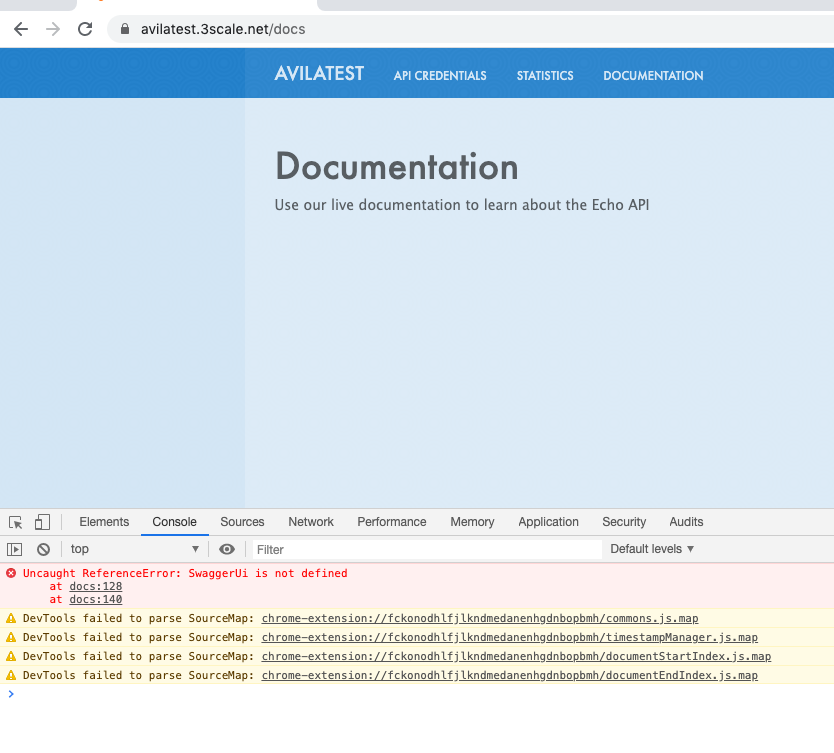
- The default Echo API (set as visible in the admin portal by default) is not rendered in the Documentation page of the developer portal.
- The browse console shows the error:
Uncaught ReferenceError: SwaggerUi is not defined
- The Documentation page of the CMS has been changed according to this commit.
Desired Behaviour:
- The default Echo API should be rendered in the Documentation page of the developer portal.
Workaround:
- Copy-paste the old content in the Documentation page (see attachment old_content_Documentation_page.html)
Dev note
Apart from rolling back these changes, we may need to regenerate the templates of accounts created since https://github.com/3scale/porta/pull/1595 was merged.
- is related to
-
THREESCALE-4818 Fix liquid templates for the Documentation page generated for OAS 3
-

- Closed
-
- relates to
-
-
- Closed
-
- links to