Uploaded image for project: 'Red Hat Workload Availability'
  1. Red Hat Workload Availability
  2. RHWA-252

[NHC-UI] Improve remediation template selection

XMLWordPrintable

    • False
    • Hide

      None

      Show
      None
    • False
    • Hide
      ## Enhanced Remediation Template Selection

      We've significantly improved the NodeHealthCheck remediation template selection experience, making it easier to choose and configure remediation templates.

      ### What's New

      **Improved Template Selection Interface**
      - Replaced radio button interface with an intuitive dropdown-based selection
      - Choose from predefined remediation template kinds: SelfNodeRemediationTemplate, FenceAgentsRemediationTemplate, or MachineDeletionRemediationTemplate
      - Custom kind option with modal that automatically populates available CRDs

      **Automatic Instance Discovery**
      - Instance dropdown automatically populates with available instances from your cluster
      - Single instance auto-selection for faster configuration
      - Quick access to create new instances directly from the selection interface

      **Enhanced Visibility and Navigation**
      - Clickable resource links to remediation templates in both list and details views
      - Operator detection with helpful alerts and installation links when required operators are missing
      - Streamlined workflow reduces clicks and configuration time

      ### Before and After

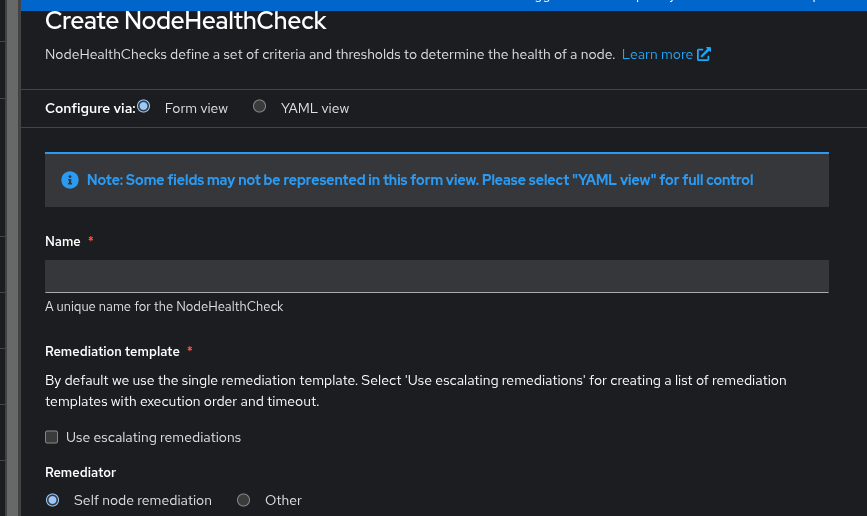
      **Before**: Manual radio button selection with default template or custom manual entry (requiring name, namespace, group, and version)

      **After**: Dropdown-based interface with automatic cluster discovery, instance auto-population, and direct navigation to resources
      Show
      ## Enhanced Remediation Template Selection We've significantly improved the NodeHealthCheck remediation template selection experience, making it easier to choose and configure remediation templates. ### What's New **Improved Template Selection Interface** - Replaced radio button interface with an intuitive dropdown-based selection - Choose from predefined remediation template kinds: SelfNodeRemediationTemplate, FenceAgentsRemediationTemplate, or MachineDeletionRemediationTemplate - Custom kind option with modal that automatically populates available CRDs **Automatic Instance Discovery** - Instance dropdown automatically populates with available instances from your cluster - Single instance auto-selection for faster configuration - Quick access to create new instances directly from the selection interface **Enhanced Visibility and Navigation** - Clickable resource links to remediation templates in both list and details views - Operator detection with helpful alerts and installation links when required operators are missing - Streamlined workflow reduces clicks and configuration time ### Before and After **Before**: Manual radio button selection with default template or custom manual entry (requiring name, namespace, group, and version) **After**: Dropdown-based interface with automatic cluster discovery, instance auto-population, and direct navigation to resources
    • Important

      Currently the UI supports selecting one of two options:
      SNR or custom. In custom option the user needs to enter manually the following fields: kind, group, version and name
      Since SNR isn't installed by default and there are other remediators that can be more suitable for the specific use case, the UI should enable chossing from the available remediation template kinds: SNR, FAR, MDR and later SBD. If the remediator operator isn't installed, the UI should provide a link to install it.
      Once the kind is selected, the UI should enable choosing the resource itself. If none exist - should provide a link to create one.

        1. image (13).png
          53 kB
          Or Raz
        2. Screencast From 2026-02-17 15-03-15.webm
          416 kB
          vipin kumar
        3. Screenshot From 2026-02-17 00-18-21.png
          158 kB
          vipin kumar
        4. Screenshot From 2026-02-17 00-18-38.png
          160 kB
          vipin kumar
        5. Screenshot From 2026-02-17 00-18-48.png
          159 kB
          vipin kumar
        6. Screenshot From 2026-02-17 00-19-01.png
          158 kB
          vipin kumar
        7. Screenshot From 2026-02-17 00-20-00.png
          156 kB
          vipin kumar
        8. Screenshot From 2026-02-17 00-20-11.png
          149 kB
          vipin kumar
        9. Screenshot From 2026-02-17 00-22-06.png
          150 kB
          vipin kumar
        10. Screenshot From 2026-02-17 00-22-12.png
          161 kB
          vipin kumar
        11. Screenshot From 2026-02-17 00-22-22.png
          146 kB
          vipin kumar
        12. Screenshot From 2026-02-17 00-22-50.png
          149 kB
          vipin kumar
        13. Screenshot From 2026-02-17 00-24-22.png
          155 kB
          vipin kumar
        14. Screenshot From 2026-02-17 00-24-29.png
          167 kB
          vipin kumar
        15. Screenshot From 2026-02-17 00-24-48.png
          138 kB
          vipin kumar
        16. Screenshot From 2026-02-17 00-24-53.png
          154 kB
          vipin kumar
        17. Screenshot From 2026-02-17 00-25-01.png
          144 kB
          vipin kumar
        18. Screenshot From 2026-02-17 00-26-43.png
          158 kB
          vipin kumar
        19. Screenshot From 2026-02-17 00-27-06.png
          157 kB
          vipin kumar
        20. Screenshot From 2026-02-17 15-03-48.png
          168 kB
          vipin kumar
        21. timeout_validation.png
          163 kB
          vipin kumar

              brotman@redhat.com Bat-Zion Rotman
              oraz@redhat.com Or Raz
              Votes:
              0 Vote for this issue
              Watchers:
              4 Start watching this issue

                Created:
                Updated:
                Resolved: