-
Feature
-
Resolution: Unresolved
-
 Critical
-
None
-
None
-
Product / Portfolio Work
-
-
100% To Do, 0% In Progress, 0% Done
-
False
-
-
False
-
None
-
None
-
None
-
None
-
-
None
-
None
-
None
-
None
Feature Overview (aka. Goal Summary)
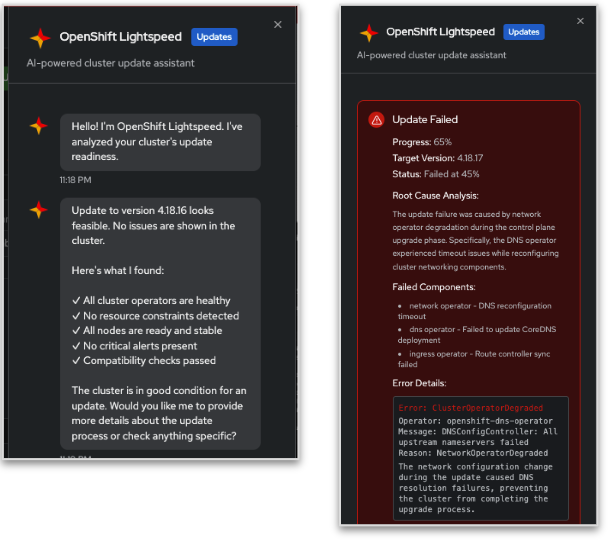
Using the MCP capabilities provided in openshift-mcp-server, a user is provided with a link on the update dashboard to connect to the OLS chat window and a custom update prompt for AI-based analysis of update-precheck and problematic update or operator failures and/or alerts and/or conditional updates of the targeted selected cluster version that highlights any potential state of update.
Goals (aka. expected user outcomes)
Before a user commences with an upgrade, they have an accurate assessment of the potential risks and changes involved without having to consult the cluster version release notes and API change documentation.
During and After an upgrade From the update dashboard or the clusterSettings page the user can get summaries in OLS chatbox.
4 Use cases: Precheck, Failed Update, Update status, Successful Update.
Requirements (aka. Acceptance Criteria):
- Pre-flight check output is analysed by prompt and handed over to OLS chatbox
- Precheck/Update status and Problematic update status summaries will be provided in OLS chatbox
- potential upgrade risk due to operator failure analysis is analyzed by prompt and handed over to OLS chatbox for further analysis or forward to troubleshooting UI.
- Either the update dashboard or the clusterSettings page will have links/buttons that, when clicked, will load the update context in OLS, and OLS will provide a summary in the Console.
Anyone reviewing this Feature needs to know which deployment configurations that the Feature will apply to (or not) once it's been completed. Describe specific needs (or indicate N/A) for each of the following deployment scenarios. For specific configurations that are out-of-scope for a given release, ensure you provide the OCPSTRAT (for the future to be supported configuration) as well.
| Deployment considerations | List applicable specific needs (N/A = not applicable) |
| Self-managed, managed, or both | Self-managed |
| Classic (standalone cluster) | yes |
| Hosted control planes | no |
| Multi node, Compact (three node), or Single node (SNO), or all | yes |
| Connected / Restricted Network | has to work in disconnected environments provided OLS also present |
| Architectures, e.g. x86_x64, ARM (aarch64), IBM Power (ppc64le), and IBM Z (s390x) | architecture independent |
| Operator compatibility | |
| Backport needed (list applicable versions) | no |
| UI need (e.g. OpenShift Console, dynamic plugin, OCM) | described in OCPSTRAT-2620 |
Background
for Update Dashboard Check Slides
and Slide-2
Pre-work completed in OCPSTRAT-2241 for update prompts and agent-driven updates. A user has a centralized entry point (such as an update dashboard or an existing cluster settings page) into the upgrade process on the cluster, with this feature covering only platform updates (layered product split into different feature OCPSTRAT-2712). An AI-generated summary shortens the analysis of each data point or source provided and proactively guides the user to areas where they should focus.
Customer Considerations
This requires a customer to have OpenShift Lightspeed enabled and connected to an MCP-capable LLM.
Out of Scope
checks breaking changes documented in the release notes, documentation, KCS
- depends on
-
-
- In Progress
-
-
-
- In Progress
-
-
-
- In Progress
-
- relates to
-
OCPSTRAT-2979 OpenShift Applied/Agentic AI Experience
-

- New
-
-
-
- In Progress
-
- split to
-
-

- New
-
