-
Bug
-
Resolution: Done
-
 Undefined
-
4.20
-
None
-
Quality / Stability / Reliability
-
False
-
-
None
-
Moderate
-
None
-
All
-
None
-
None
-
None
-
Done
-
Release Note Not Required
-
N/A
-
None
-
None
-
None
-
None
Description of problem:
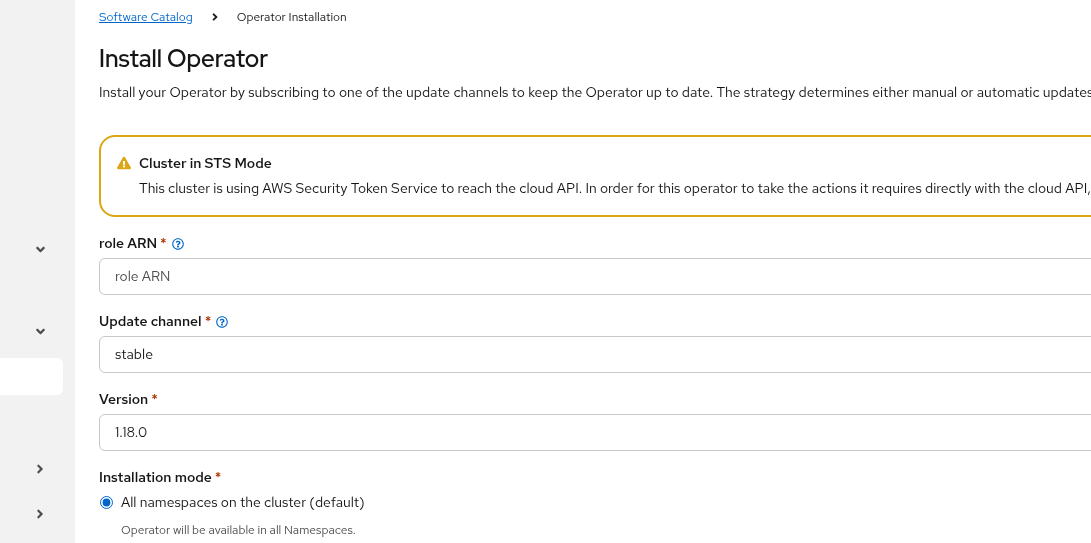
The "install operator" page shouldn't show the field role ARN when "features.operators.openshift.io/token-auth-aws" is false in the CSV annotations
Version-Release number of selected component
4.20
How reproducible:
Always
Steps to Reproduce:
    1. Launch one AWS STS enabled cluster
    2. Deploy cluster-logging operator using Management Console
Actual results:
The UI guide us to input role ARN and role ARN is mandatory field.
Expected results:
The role ARN field only appears when the operator CSV annotation features.operators.openshift.io/token-auth-aws"="true",
Additional info:
No such problem in 4.19
- blocks
-
-
- Closed
-
-
-
- Closed
-
- is cloned by
-
-
- Closed
-
-
-
- Closed
-
- is duplicated by
-
-
- Closed
-
- is related to
-
-

- Closed
-
- links to