-
Bug
-
Resolution: Done-Errata
-
 Undefined
-
CNV v4.20.0
-
None
-
Quality / Stability / Reliability
-
5
-
False
-
-
False
-
CNV v4.21.0.rhel9-25
-
CNV Storage Sprint 279, CNV Storage Sprint 280, CNV Storage Sprint 281, CNV Storage Sprint 282, CNV Storage Sprint 283
-
None
Description of problem:
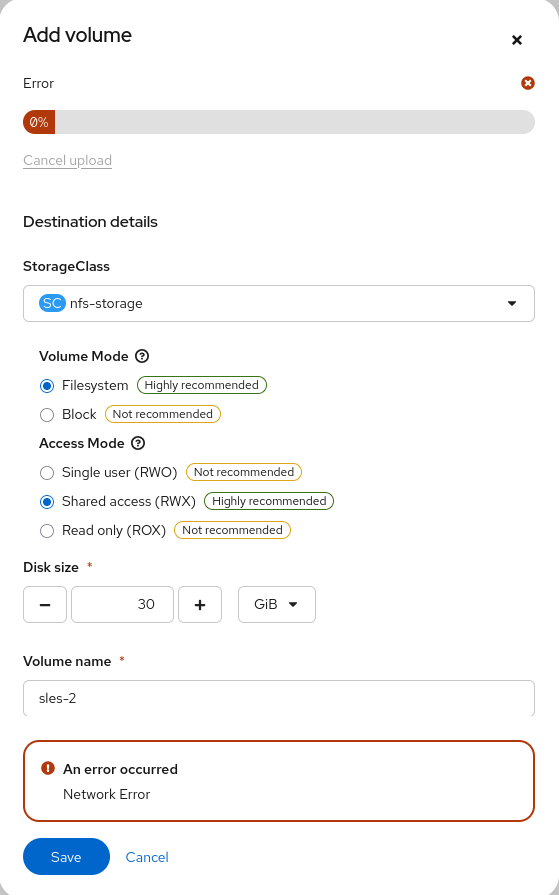
While uploading a QCOW image to the openshift-virtualization-os-images
 namespace/project (refer to the attached screenshot and logs), a
"Network Error" message appears after some time during the upload
process. This issue occurs with both NFS and ODF storage.
Version-Release number of selected component (if applicable):
v4.99.0.rhel9-2362, v4.20.0.rhel9-91
How reproducible:
Completely reproducible following the steps since the releases posted above
Steps to Reproduce:
1. Virtualization
2. Bootable volumes
3. Add Volume
4. Upload qcow image
5. Select destination project "openshift-virtualization-os-images"
6. Pick default settings
7. Save
Actual results:
An error occurred: Network Error
Expected results:
Volume gets uploaded successfully.
Additional info:
Please see attached screenshot and logs
- is related to
-
-

- New
-
- links to
-
 RHEA-2025:155516
OpenShift Virtualization 4.21.0 Images
RHEA-2025:155516
OpenShift Virtualization 4.21.0 Images
- mentioned on

(6 mentioned on)

