Uploaded image for project: 'WildFly'
  1. WildFly
  2. WFLY-4262

Memory of expired session not released

XMLWordPrintable

    • Icon: Bug Bug
    • Resolution: Cannot Reproduce
    • Icon: Major Major
    • None
    • 8.2.0.Final
    • Web (Undertow)
    • None
    • Running on Windows 7
      Wildfly 8.2
      Primefaces 5.1

    • Hide

      1. Set user session expiration to 20minutes in web.xml
      <session-config>
      <session-timeout>20</session-timeout>
      <cookie-config>
      <path>/</path>
      </cookie-config>
      </session-config>
      2. Deploy project to clean WildFy 8.2
      3. Simulated traffic with JMeter, creating new user session on every request, till the JVM memory is almost fully used.
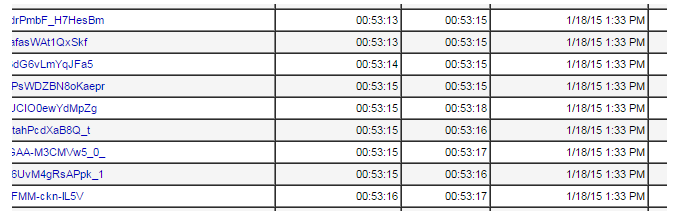
      4. wait 20 minutes and verify that the sessions was not removed
      5. try to make new requests - verify that session waas not removed
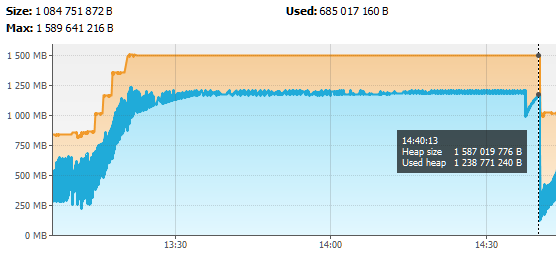
      6. perform System.gc() from the code or from fe: VisualVM

      Show
      1. Set user session expiration to 20minutes in web.xml <session-config> <session-timeout>20</session-timeout> <cookie-config> <path>/</path> </cookie-config> </session-config> 2. Deploy project to clean WildFy 8.2 3. Simulated traffic with JMeter, creating new user session on every request, till the JVM memory is almost fully used. 4. wait 20 minutes and verify that the sessions was not removed 5. try to make new requests - verify that session waas not removed 6. perform System.gc() from the code or from fe: VisualVM

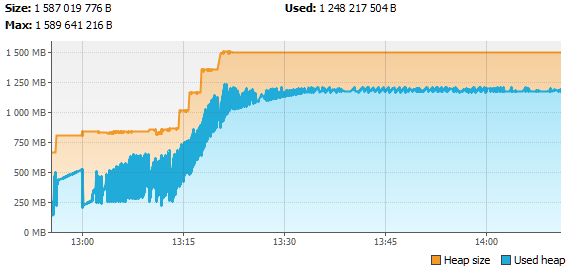
      Expecting Wildfly to remove expired user session data after 20 minutes. But the memory is released later (see the screen shots from VisualVM)

        1. Expired session still available.png
          27 kB
          Jose Perez
        2. JVM memory usage.png
          22 kB
          Jose Perez
        3. screenshot-1.png
          22 kB
          Jose Perez

              sdouglas1@redhat.com Stuart Douglas (Inactive)
              wojciech.ozga_jira Jose Perez (Inactive)
              Votes:
              0 Vote for this issue
              Watchers:
              3 Start watching this issue

                Created:
                Updated:
                Resolved: