-
Bug
-
Resolution: Done
-
 Major
Major
-
None
-
RHODS_1.25.0_GA
Description of problem:
Facing a error while trying to update environment variables in a workbench in the following user scenario:
- workbench was created with 2 env variables with Secret type: one with Upload (secret-1) and the other one with Key/Value method (secret-2)
- edit the workbench to remove one of the 2 env variables and add a new one (secret-3)
Results:
1) not possible to edit the workbench: first error showing up is
Operation cannot be fulfilled on notebooks.kubeflow.org "workbench1": the object has been modified; please apply your changes to the latest version and try again
After clicking "Update workbench" button again, the error becomes
secret <removed-secret-name> not found
2) After clicking on "Update workbench" and getting the error, if you exit the workbench Edit page and go into it once again, all the env variables are removed from the Edit page (the envFrom.secretRef in the notebook CR are still present).
3) the new secret is created (secret-3), but when deleting the workbench it doesn't get deleted as expected
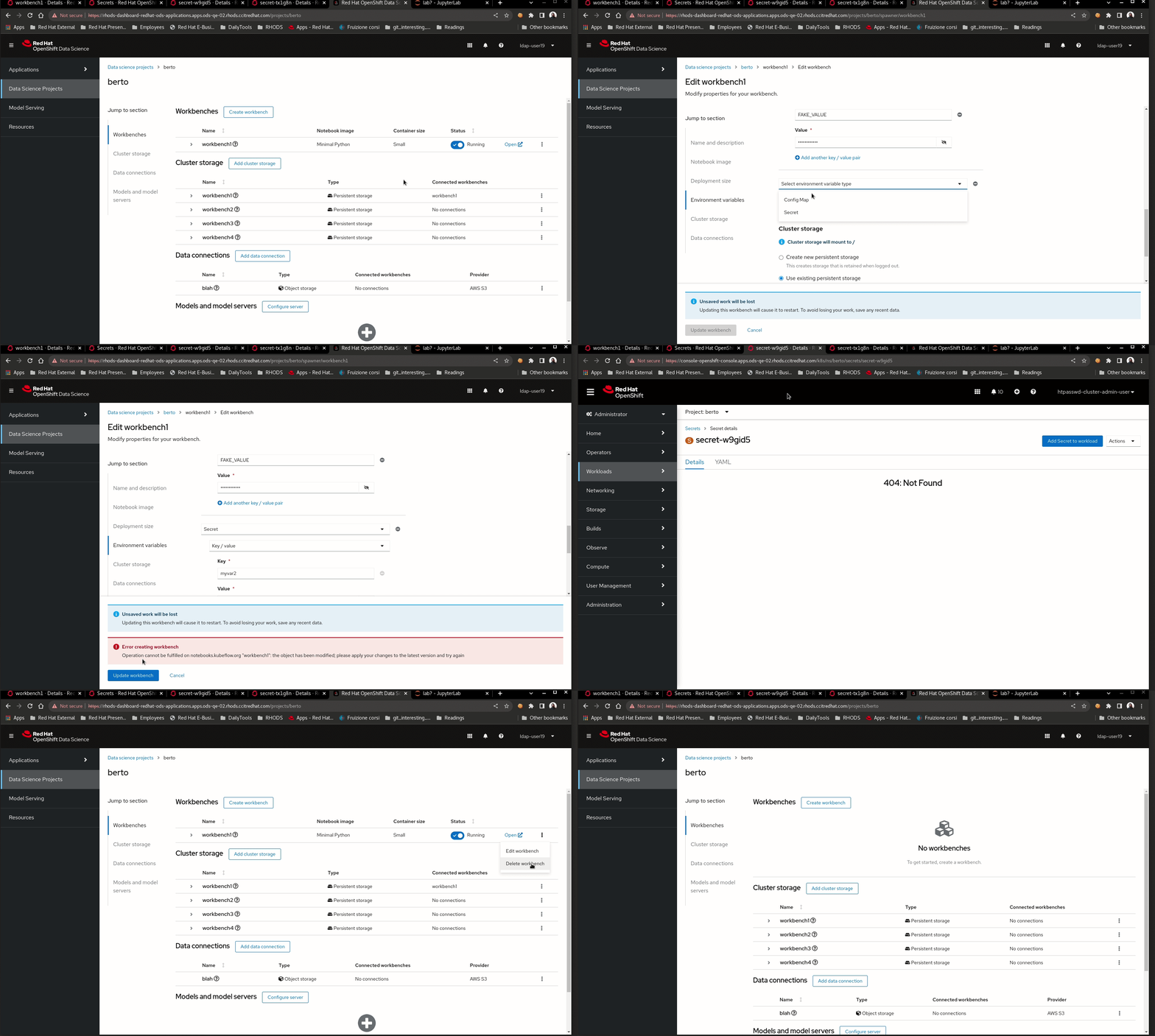
GIF showing the process
Prerequisites (if any, like setup, operators/versions):
Steps to Reproduce
- Create a workbench with 2 env variables with Secret type: one with Upload (secret-1) and the other one with Key/Value method (secret-2)
- check the Openshift Secrets created under the workbench namespace (2 secrets expected)
- edit the workbench to remove one of the 2 env variables and add a new one (secret-
- click on "Update workbench" and check the error
- click again on the update button and check if the error persists and if it changed
- check the Openshift Secrets created under the workbench namespace (2 secrets expected, 3 found)
- click "cancel" button to exit from Edit form
- click "Edit workbench" from the 3-dots menu on the right of your workbench to enter the Edit form once again
- check the env variables section
Actual results:
- Blocking error showing while updating the env variables in the workbench
- new secret gets created even if the workbench update fails and it doesn't get deleted after workbench deletion
- error about deleted secret appears while deleting the workbench. It's not blocking the deletion, though
Expected results:
- No errors while updating the env variables in the workbench
- the new secret gets deleted after workbench deletion
- no error appearing while deleting the workbench
Reproducibility (Always/Intermittent/Only Once):
Intermittent - was able to reproduce few times, but not always
Build Details:
RHODS v1.25.0
Workaround:
- removing the SecretRef of the old secret from the workbench CR, restart the workbench
- manually delete the new OpenShift Secret from the namespace
- re-add the new env variable using the workbench Edit form
Additional info:
- the scenario seems very specific, e.g., one secret with Upload method and one with Key/Value, but the issue might be present in more scenarios QE wasn't able to reproduce so far