-
Task
-
Resolution: Done
-
 Critical
-
None
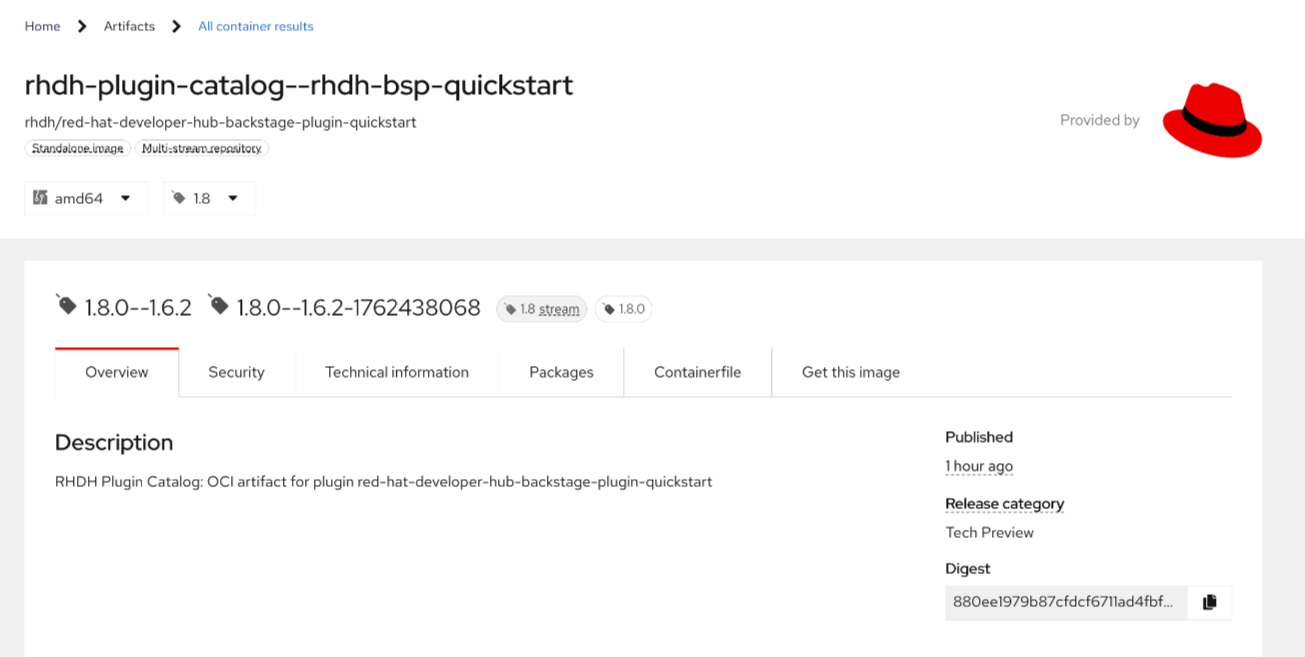
In the content that appears in the RHEC entry for our first staged plugin https://issues.redhat.com/browse/RHIDP-7998?focusedId=28405986&page=com.atlassian.jira.plugin.system.issuetabpanels:comment-tabpanel#comment-28405986 we see the Description text is generated and lacks information about the what/why/how for this plugin.
https://issues.redhat.com/secure/attachment/13550114/screenshot-2.png
https://catalog.stage.redhat.com/en/software/containers/rhdh/red-hat-developer-hub-backstage-plugin-quickstart/68ee9e3e22830af343fded75#overview (needs VPN, might need cache clear if you have corrupt cookies)
I spoke with Ben and he suggested to append this simple call to action text after the plugin name:
For more information about this plugin, please refer to its entry in the Red Hat Developer Hub Extensions Catalog. The Extensions Catalog is available to all administrators of Red Hat Developer Hub and is accessed from the Administration panel available in version {RHDH_X.Y_VERSION}.
This information is loaded from the pyxis config, set via this script:
long_description: "RHDH Plugin Catalog: OCI artifact for plugin $plugin_name"
So we can update the script and regen the metadata in Pyxis, then use the https://gitlab.cee.redhat.com/rhidp/rhdh-plugin-catalog/-/blob/rhdh-1-rhel-9/.tekton/generatePipelineRunsForPlugins.sh script to build and https://gitlab.cee.redhat.com/rhidp/rhdh-plugin-catalog/-/blob/rhdh-1-rhel-9/build/scripts/kfuxRelease.sh to release a new version of the plugin to stage to see the revised copy appear there.