-
Bug
-
Resolution: Unresolved
-
 Normal
-
rhel-10.1
-
None
-
virt-v2v-2.10.0-7.el10
-
No
-
Critical
-
1
-
rhel-virt-tools
-
ssg_virtualization
-
0.001
-
False
-
False
-
-
No
-
rhel-virt-tools-task-splitter
-
Unspecified Release Note Type - Unknown
-
Unspecified
-
Unspecified
-
Unspecified
-
None
Description of problem:
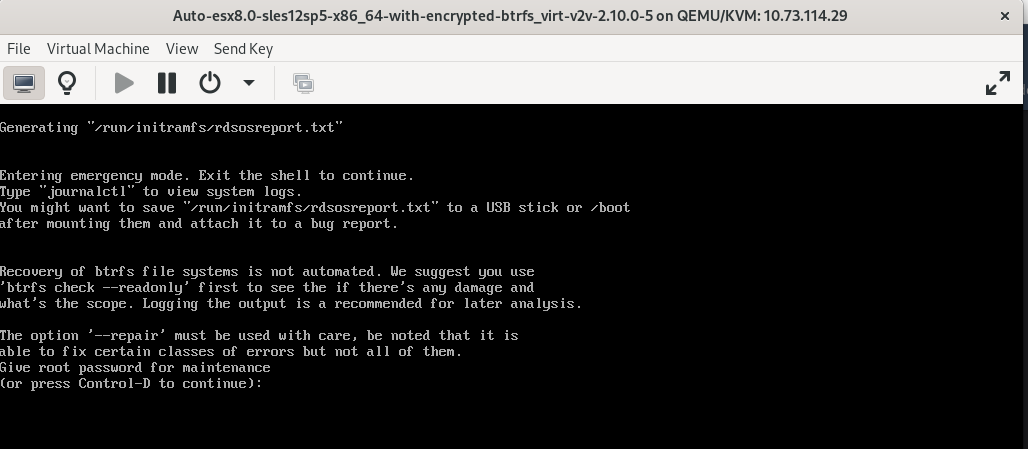
sles12sp5 guest with encrypted brtfs fliesystem fails to boot into OS after v2v conversion
Version-Release number of selected component (if applicable):
virt-v2v-2.7.16-2.el10.x86_64
libguestfs-fssupport-10.0-1.el10.x86_64
kernel-6.12.0-84.el10.x86_64
libguestfs-1.55.13-1.el10.x86_64
guestfs-tools-1.54.0-1.el10.x86_64
nbdkit-1.42.2-4.el10.x86_64
libnbd-1.22.2-1.el10.x86_64
libvirt-libs-11.3.0-1.el10.x86_64
qemu-img-10.0.0-3.el10.x86_64
How reproducible:
100%
Steps:
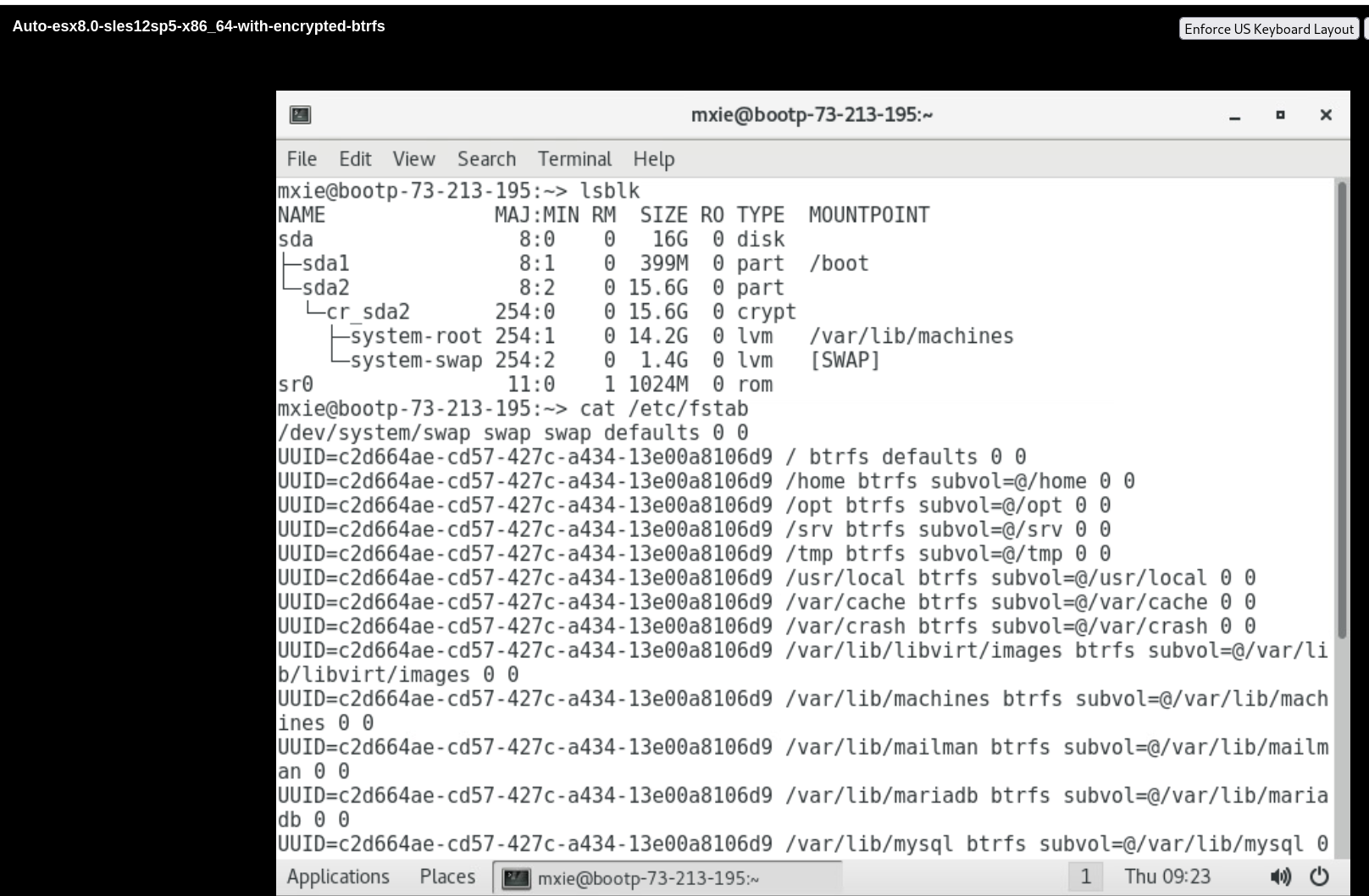
1. Prepare a sles12sp5 guest with encrypted brtfs fliesystem on VMware
# lsblk
NAME              MAJ:MIN RM  SIZE RO TYPE  MOUNTPOINT
sda                 8:0    0   16G  0 disk
├─sda1              8:1    0  399M  0 part  /boot
└─sda2              8:2    0 15.6G  0 part
  └─cr_sda2       254:0    0 15.6G  0 crypt
    ├─system-root 254:1    0 14.2G  0 lvm   /
    └─system-swap 254:2    0  1.4G  0 lvm   [SWAP]
sr0                11:0    1  3.8G  0 rom   /run/media/root/SLE-12-SP5-Server-DVD-x86_640372

# cat /etc/fstab
/dev/system/swap swap swap defaults 0 0
UUID=c2d664ae-cd57-427c-a434-13e00a8106d9 / btrfs defaults 0 0
UUID=c2d664ae-cd57-427c-a434-13e00a8106d9 /home btrfs subvol=@/home 0 0
UUID=c2d664ae-cd57-427c-a434-13e00a8106d9 /opt btrfs subvol=@/opt 0 0
UUID=c2d664ae-cd57-427c-a434-13e00a8106d9 /srv btrfs subvol=@/srv 0 0
UUID=c2d664ae-cd57-427c-a434-13e00a8106d9 /tmp btrfs subvol=@/tmp 0 0
UUID=c2d664ae-cd57-427c-a434-13e00a8106d9 /usr/local btrfs subvol=@/usr/local 0 0
UUID=c2d664ae-cd57-427c-a434-13e00a8106d9 /var/cache btrfs subvol=@/var/cache 0 0
UUID=c2d664ae-cd57-427c-a434-13e00a8106d9 /var/crash btrfs subvol=@/var/crash 0 0
UUID=c2d664ae-cd57-427c-a434-13e00a8106d9 /var/lib/libvirt/images btrfs subvol=@/var/lib/libvirt/images 0 0
UUID=c2d664ae-cd57-427c-a434-13e00a8106d9 /var/lib/machines btrfs subvol=@/var/lib/machines 0 0
UUID=c2d664ae-cd57-427c-a434-13e00a8106d9 /var/lib/mailman btrfs subvol=@/var/lib/mailman 0 0
UUID=c2d664ae-cd57-427c-a434-13e00a8106d9 /var/lib/mariadb btrfs subvol=@/var/lib/mariadb 0 0
UUID=c2d664ae-cd57-427c-a434-13e00a8106d9 /var/lib/mysql btrfs subvol=@/var/lib/mysql 0 0
UUID=c2d664ae-cd57-427c-a434-13e00a8106d9 /var/lib/named btrfs subvol=@/var/lib/named 0 0
UUID=c2d664ae-cd57-427c-a434-13e00a8106d9 /var/lib/pgsql btrfs subvol=@/var/lib/pgsql 0 0
UUID=c2d664ae-cd57-427c-a434-13e00a8106d9 /var/log btrfs subvol=@/var/log 0 0
UUID=c2d664ae-cd57-427c-a434-13e00a8106d9 /var/opt btrfs subvol=@/var/opt 0 0
UUID=c2d664ae-cd57-427c-a434-13e00a8106d9 /var/spool btrfs subvol=@/var/spool 0 0
UUID=c2d664ae-cd57-427c-a434-13e00a8106d9 /var/tmp btrfs subvol=@/var/tmp 0 0
UUID=c2d664ae-cd57-427c-a434-13e00a8106d9 /.snapshots btrfs subvol=@/.snapshots 0 0
UUID=f4c500db-2386-4084-a896-b38c08126a4c /boot                ext4       acl,user_xattr        1 2
2. Convert the guest from VMware to local libvirt by virt-v2v
# virt-v2v -ic vpx://non-admin%40vsphere.local@10.73.212.129/data/10.73.212.36/?no_verify=1  -it vddk -io vddk-libdir=/home/vddk8.0.3 -io vddk-thumbprint=CB:9F:B1:9D:33:49:6C:60:AD:3C:A5:16:77:91:5F:CD:1B:24:B1:43 -ip /home/passwd esx8.0-sles12sp5-x86_64-with-encrypted-btrfs --key all:key:redhat123 --root first
[   0.0] Setting up the source: -i libvirt -ic vpx://non-admin%40vsphere.local@10.73.212.129/data/10.73.212.36/?no_verify=1 -it vddk esx8.0-sles12sp5-x86_64-with-encrypted-btrfs
[   1.7] Opening the source
[  17.8] Checking filesystem integrity before conversion
[ 124.4] Detecting if this guest uses BIOS or UEFI to boot
[ 124.6] Inspecting the source
virt-v2v: Picked /dev/system/root because '--root first' was used.
[ 135.9] Checking for sufficient free disk space in the guest
[ 135.9] Converting SUSE Linux Enterprise Server 12 SP5 (sles12sp5) to run on KVM
virt-v2v: warning: ignoring kernel /vmlinuz-4.12.14-120-default in
bootloader, as it does not exist.
virt-v2v: The QEMU Guest Agent will be installed for this guest at first
boot.
virt-v2v: This guest has virtio drivers installed.
[ 185.0] Setting a random seed
[ 185.0] SELinux relabelling
[ 185.4] Mapping filesystem data to avoid copying unused and blank areas
virt-v2v: warning: fstrim on guest filesystem
btrfsvol:/dev/system/root/@/.snapshots/3/snapshot failed.  Usually you can
ignore this message.  To find out more read "Trimming" in virt-v2v(1).
Original message: fstrim: fstrim: /sysroot/: the discard operation is not
supported
virt-v2v: warning: fstrim on guest filesystem
btrfsvol:/dev/system/root/@/.snapshots/2/snapshot failed.  Usually you can
ignore this message.  To find out more read "Trimming" in virt-v2v(1).
Original message: fstrim: fstrim: /sysroot/: the discard operation is not
supported
virt-v2v: warning: fstrim on guest filesystem
btrfsvol:/dev/system/root/@/var/tmp failed.  Usually you can ignore this
message.  To find out more read "Trimming" in virt-v2v(1).
Original message: fstrim: fstrim: /sysroot/: the discard operation is not
supported
virt-v2v: warning: fstrim on guest filesystem
btrfsvol:/dev/system/root/@/var/spool failed.  Usually you can ignore this
message.  To find out more read "Trimming" in virt-v2v(1).
Original message: fstrim: fstrim: /sysroot/: the discard operation is not
supported
virt-v2v: warning: fstrim on guest filesystem
btrfsvol:/dev/system/root/@/var/opt failed.  Usually you can ignore this
message.  To find out more read "Trimming" in virt-v2v(1).
Original message: fstrim: fstrim: /sysroot/: the discard operation is not
supported
virt-v2v: warning: fstrim on guest filesystem
btrfsvol:/dev/system/root/@/var/log failed.  Usually you can ignore this
message.  To find out more read "Trimming" in virt-v2v(1).
Original message: fstrim: fstrim: /sysroot/: the discard operation is not
supported
virt-v2v: warning: fstrim on guest filesystem
btrfsvol:/dev/system/root/@/var/lib/pgsql failed.  Usually you can ignore
this message.  To find out more read "Trimming" in virt-v2v(1).
Original message: fstrim: fstrim: /sysroot/: the discard operation is not
supported
virt-v2v: warning: fstrim on guest filesystem
btrfsvol:/dev/system/root/@/var/lib/named failed.  Usually you can ignore
this message.  To find out more read "Trimming" in virt-v2v(1).
Original message: fstrim: fstrim: /sysroot/: the discard operation is not
supported
virt-v2v: warning: fstrim on guest filesystem
btrfsvol:/dev/system/root/@/var/lib/mysql failed.  Usually you can ignore
this message.  To find out more read "Trimming" in virt-v2v(1).
Original message: fstrim: fstrim: /sysroot/: the discard operation is not
supported
virt-v2v: warning: fstrim on guest filesystem
btrfsvol:/dev/system/root/@/var/lib/mariadb failed.  Usually you can ignore
this message.  To find out more read "Trimming" in virt-v2v(1).
Original message: fstrim: fstrim: /sysroot/: the discard operation is not
supported
virt-v2v: warning: fstrim on guest filesystem
btrfsvol:/dev/system/root/@/var/lib/mailman failed.  Usually you can ignore
this message.  To find out more read "Trimming" in virt-v2v(1).
Original message: fstrim: fstrim: /sysroot/: the discard operation is not
supported
virt-v2v: warning: fstrim on guest filesystem
btrfsvol:/dev/system/root/@/var/lib/machines failed.  Usually you can
ignore this message.  To find out more read "Trimming" in virt-v2v(1).
Original message: fstrim: fstrim: /sysroot/: the discard operation is not
supported
virt-v2v: warning: fstrim on guest filesystem
btrfsvol:/dev/system/root/@/var/lib/libvirt/images failed.  Usually you can
ignore this message.  To find out more read "Trimming" in virt-v2v(1).
Original message: fstrim: fstrim: /sysroot/: the discard operation is not
supported
virt-v2v: warning: fstrim on guest filesystem
btrfsvol:/dev/system/root/@/var/crash failed.  Usually you can ignore this
message.  To find out more read "Trimming" in virt-v2v(1).
Original message: fstrim: fstrim: /sysroot/: the discard operation is not
supported
virt-v2v: warning: fstrim on guest filesystem
btrfsvol:/dev/system/root/@/var/cache failed.  Usually you can ignore this
message.  To find out more read "Trimming" in virt-v2v(1).
Original message: fstrim: fstrim: /sysroot/: the discard operation is not
supported
virt-v2v: warning: fstrim on guest filesystem
btrfsvol:/dev/system/root/@/usr/local failed.  Usually you can ignore this
message.  To find out more read "Trimming" in virt-v2v(1).
Original message: fstrim: fstrim: /sysroot/: the discard operation is not
supported
virt-v2v: warning: fstrim on guest filesystem
btrfsvol:/dev/system/root/@/tmp failed.  Usually you can ignore this
message.  To find out more read "Trimming" in virt-v2v(1).
Original message: fstrim: fstrim: /sysroot/: the discard operation is not
supported
virt-v2v: warning: fstrim on guest filesystem
btrfsvol:/dev/system/root/@/srv failed.  Usually you can ignore this
message.  To find out more read "Trimming" in virt-v2v(1).
Original message: fstrim: fstrim: /sysroot/: the discard operation is not
supported
virt-v2v: warning: fstrim on guest filesystem
btrfsvol:/dev/system/root/@/opt failed.  Usually you can ignore this
message.  To find out more read "Trimming" in virt-v2v(1).
Original message: fstrim: fstrim: /sysroot/: the discard operation is not
supported
virt-v2v: warning: fstrim on guest filesystem
btrfsvol:/dev/system/root/@/home failed.  Usually you can ignore this
message.  To find out more read "Trimming" in virt-v2v(1).
Original message: fstrim: fstrim: /sysroot/: the discard operation is not
supported
virt-v2v: warning: fstrim on guest filesystem
btrfsvol:/dev/system/root/@/.snapshots failed.  Usually you can ignore this
message.  To find out more read "Trimming" in virt-v2v(1).
Original message: fstrim: fstrim: /sysroot/: the discard operation is not
supported
virt-v2v: warning: fstrim on guest filesystem btrfsvol:/dev/system/root/@
failed.  Usually you can ignore this message.  To find out more read
"Trimming" in virt-v2v(1).
Original message: fstrim: fstrim: /sysroot/: the discard operation is not
supported
virt-v2v: warning: fstrim on guest filesystem /dev/system/root failed.
Usually you can ignore this message.  To find out more read "Trimming" in
virt-v2v(1).
Original message: fstrim: fstrim: /sysroot/: the discard operation is not
supported
[ 188.4] Checking filesystem integrity after conversion
[ 193.3] Closing the overlay
[ 193.6] Assigning disks to buses
[ 193.6] Checking if the guest needs BIOS or UEFI to boot
[ 193.6] Setting up the destination: -o libvirt
[ 195.6] Copying disk 1/1
█ 100% [****************************************]
[ 538.3] Creating output metadata
[ 538.4] Finishing off
3. Check the guest after v2v conversion, found the guest can't boot into OS
Actual result:
As description
Expect result:
Fix the bug
Additional info
- is related to
-
-

- Closed
-
- links to
-
 RHBA-2025:155148
virt-v2v update
RHBA-2025:155148
virt-v2v update

