Uploaded image for project: 'RHEL'
  1. RHEL
  2. RHEL-68802

After installing groups, the system becomes a read-only file system

Linking RHIVOS CVEs to...Migration: Automation ...SWIFT: POC ConversionSync from "Extern...XMLWordPrintable

    • Icon: Bug Bug
    • Resolution: Duplicate
    • Icon: Critical Critical
    • None
    • rhel-10.0
    • dnf
    • No
    • None
    • rhel-swm
    • ssg_core_services
    • None
    • False
    • False
    • Hide

      None

      Show
      None
    • None
    • None
    • None
    • None
    • All
    • None

      What were you trying to do that didn't work?

      After installing groups, the system becomes a read-only file system

      Please provide the package NVR for which the bug is seen:

      Distro RHEL-10.0-20241124.0

      How reproducible is this bug?:

      100%

      Steps to reproduce

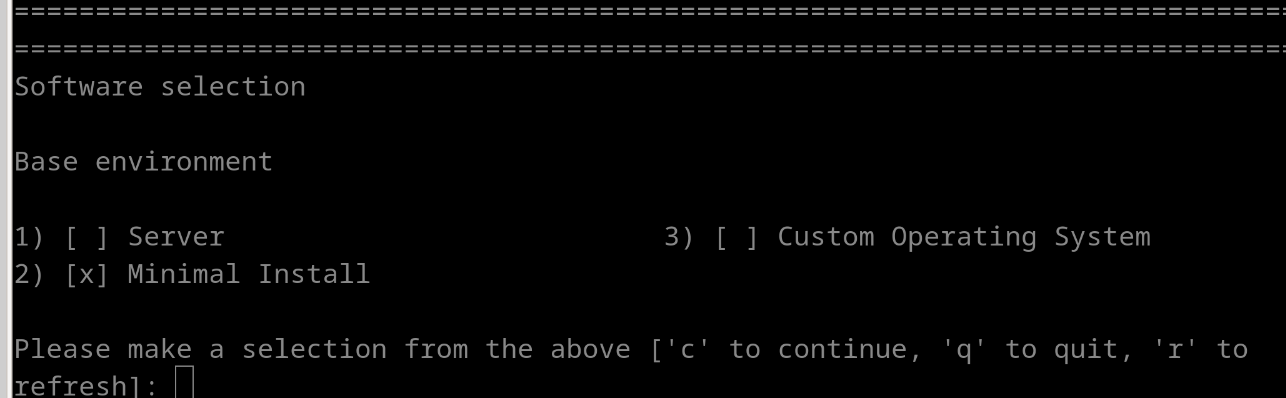
      1.  virt-install --name vm2 --boot uefi --location http://download.eng.bos.redhat.com/rhel-10/composes/RHEL-10/RHEL-10.0-20241124.0/compose/BaseOS/aarch64/os/ --os-variant rhel9-unknown --memory 2048
      2.  Select "Minimal Installation"
      3.  Reboot after installation
      4. log in to the system
      5. yum group install -y "Custom Operating System"
      6. reboot
      7. yum group list

      Expected results

      There should not be errors.

      Actual results

      Got below error:

      [root@localhost ~]# yum group list
      Config error: [Errno 30] Read-only file system: '/var/log/dnf.log': '/var/log/dnf.log'
      [root@localhost ~]#
      

        1. install_group.png
          47 kB
          Yingshun Cui
        2. pkg_install.txt
          12 kB
          Yingshun Cui
        3. reboot_vm.log
          130 kB
          Yingshun Cui

              packaging-team-maint packaging-team-maint
              yicui1 Yingshun Cui
              packaging-team-maint packaging-team-maint
              Software Management QE Software Management QE
              Votes:
              0 Vote for this issue
              Watchers:
              4 Start watching this issue

                Created:
                Updated:
                Resolved: