-
Bug
-
Resolution: Unresolved
-
 Normal
-
rhel-10.2
-
None
-
libvirt-11.10.0-8.el10
-
None
-
Low
-
rhel-virt-core-libvirt-1
-
1
-
None
-
False
-
False
-
-
No
-
Libvirt Bugs already in Sprint
-
Unspecified Release Note Type - Unknown
-
Unspecified
-
Unspecified
-
Unspecified
-
-
x86_64
-
None
Description of problem:
Fail to connect vsphere client via ipv6 if using ipv6 address of ESXi host in virsh command
Version-Release number of selected component (if applicable):
libvirt-libs-11.10.0-4.el10.x86_64
How reproducible:
100%
Steps:
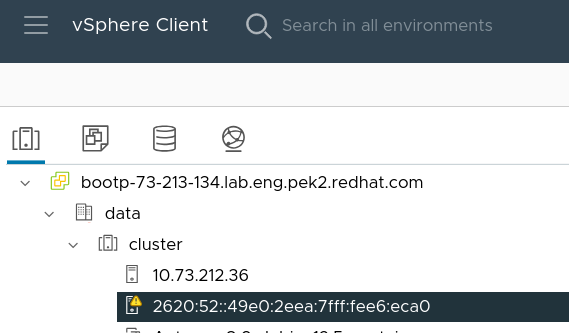
1. Enable ipv6 address on ESXi host and vCenter server
2. Connect vsphere client via ipv6 and using ipv6 address of ESXi host in virsh command
# virsh -c vpx://root@[2620:52:0:49d4:20c:29ff:fe86:a4bc]/data/cluster/[2620:52:0:49d4:ee2a:72ff:fe0a:7baa]/?no_verify=1
error: failed to connect to the hypervisor
error: internal error: Unable to parse URI vpx://root@[2620:52:0:49d4:20c:29ff:fe86:a4bc]/data/cluster/[2620:52:0:49d4:ee2a:72ff:fe0a:7baa]/?no_verify=1
# virsh -c vpx://root@[2620:52:0:49d4:20c:29ff:fe86:a4bc]/data/cluster/%5B2620:52:0:49d4:ee2a:72ff:fe0a:7baa%5D/?no_verify=1
Enter root's password for 2620:52:0:49d4:20c:29ff:fe86:a4bc:
error: failed to connect to the hypervisor
error: internal error: Could not find host system specified in '/data/cluster/[2620:52:0:49d4:ee2a:72ff:fe0a:7baa]/'
# virsh -c vpx://root@[2620:52:0:49d4:20c:29ff:fe86:a4bc]/data/cluster/2620:52:0:49d4:ee2a:72ff:fe0a:7baa/?no_verify=1
Enter root's password for 2620:52:0:49d4:20c:29ff:fe86:a4bc:
error: failed to connect to the hypervisor
error: internal error: Could not find host system specified in '/data/cluster/2620:52:0:49d4:ee2a:72ff:fe0a:7baa/'
Actual result:
As above description
Expect result:
Fix the bug
Additional info
1. Can connect vsphere client via ipv6 if using ipv4 address of ESXi host in virsh command
# virsh -c vpx://root@[2620:52:0:49d4:20c:29ff:fe86:a4bc]/data/cluster/10.73.212.36/?no_verify=1
Enter root's password for 2620:52:0:49d4:20c:29ff:fe86:a4bc:
Welcome to virsh, the virtualization interactive terminal.
Type:  'help' for help with commands
       'quit' to quit
virsh #
2. Can connect ESXi host via ipv6 by virsh
# virsh -c esx://root@[2620:52:0:49d4:ee2a:72ff:fe0a:7baa]/?no_verify=1
Enter root's password for 2620:52:0:49d4:ee2a:72ff:fe0a:7baa:
Welcome to virsh, the virtualization interactive terminal.
Type:  'help' for help with commands
       'quit' to quit
virsh #
3. The bug can be reproduced on rhel10.1 with libvirt-libs-11.5.0-4.7.el10_1.x86_64
- blocks
-
-

- Closed
-