-
Bug
-
Resolution: Unresolved
-
 Major
Major
-
None
-
1.9.0
-
False
-
-
False
-
-
Description of problem:
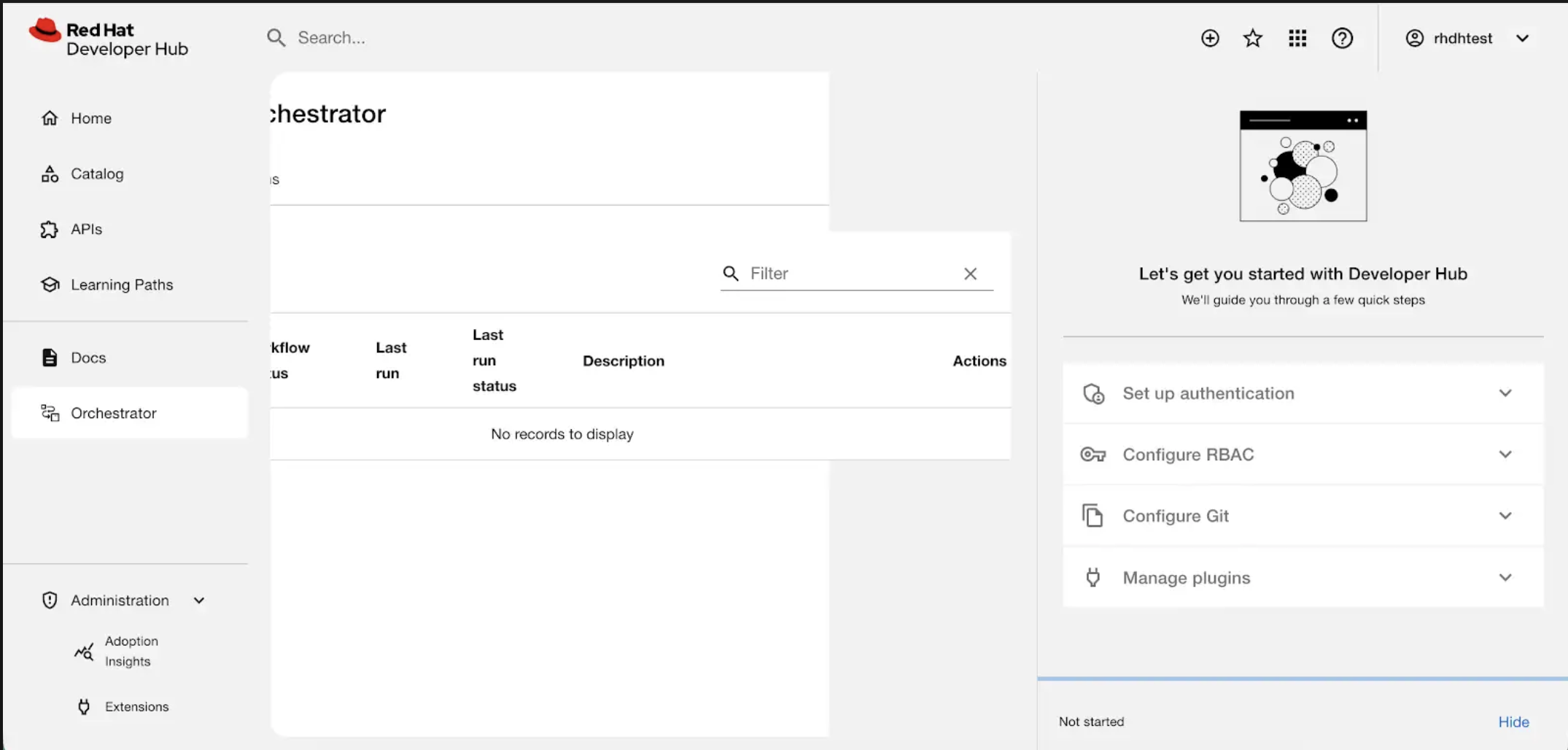
The Orchestrator table is not scaling to the page width, causing a horizontal scroll that overlaps with the Quick Start section.
Prerequisites (if any, like setup, operators/versions):
- Quick start should be open
- The Orchestrator plugin installed
Steps to Reproduce
- Run RHDH
- Open the quick start
- Click on the Orchestrator navigation item
Actual results:
When the Quick Start panel is open on the Orchestrator main page, the table fails to resize correctly and overflows the page boundaries. (see attached).
Expected results:
The Orchestrator table should be fully responsive. When the Quick Start panel is open, the table should dynamically resize to fit the remaining viewport width. If the data exceeds the available space, the table should implement an internal horizontal scroll rather than overflowing the page boundaries or breaking the layout.
Reproducibility (Always/Intermittent/Only Once):
Build Details:
Additional info (Such as Logs, Screenshots, etc):
Test day, reported on line 36.