Normal
 Description of problem:
In RHDH 1.8, TechDocs Level 3 headings (###) are rendering with a font size that is visibly smaller and less distinct than the standard paragraph body text. This breaks the visual hierarchy of the documentation.
Prerequisites (if any, like setup, operators/versions):
- An RHDH instance running version 1.8.
- TechDocs Addons (plugins) are installed and enabled. (this may or may not be related to the issue, they are on in my test system)
- A registered component with TechDocs enabled.
- A .md file within the documentation containing Level 3 headings (###) followed by standard paragraph text.
Steps to Reproduce
- Log in to Red Hat Developer Hub.
- Navigate to Docs or the TechDocs tab of a component.
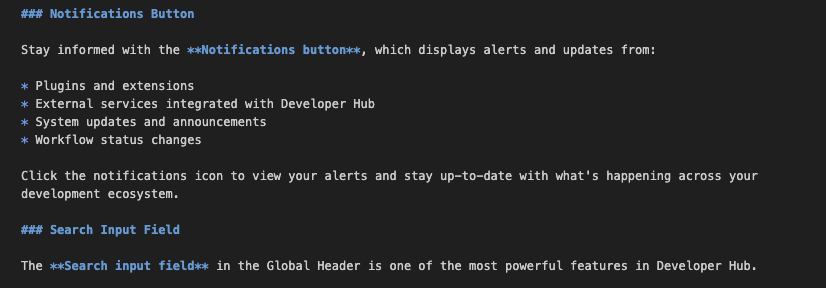
- Open a documentation page that utilizes ### (H3) markdown syntax. (e.g., ### Notifications Button).
- Observe the rendered font size of the header compared to the text immediately following it.
Actual results:
The text rendered from the ### markdown is smaller and less legible than the standard paragraph text below it. The visual weight does not indicate that it is a header.
Expected results:
The Level 3 heading should be larger, bolder, or visually distinct from the body text to clearly indicate a new sub-section, adhering to standard typography hierarchy principles (as should all headings, not just L3)
Reproducibility (Always/Intermittent/Only Once):
Always
Build Details:
- Environment: RHDH
- Version/Build: RHDH v1.8
- Browser/OS: Agnostic (Visual CSS issue observed on macOS/Chrome)
Additional info (Such as Logs, Screenshots, etc):
- Configuration Notes: Issue persists at both 90% and 100% browser zoom, indicating this is a CSS definition issue, not a browser rendering artifact.
- Root Cause Hypothesis: Possible conflict between RHDH 1.8 styling updates and existing TechDocs Addons CSS, or a regression in the base theme's h3 typography variables.
- Attachments:
- Screenshot 1: Shows the markdown source code.
- Screenshot 2: Shows the rendered output demonstrating the size discrepancy.