-
Story
-
Resolution: Unresolved
-
 Normal
-
None
-
None
-
Product / Portfolio Work
-
False
-
-
False
-
None
-
Unset
-
None
-
-
-
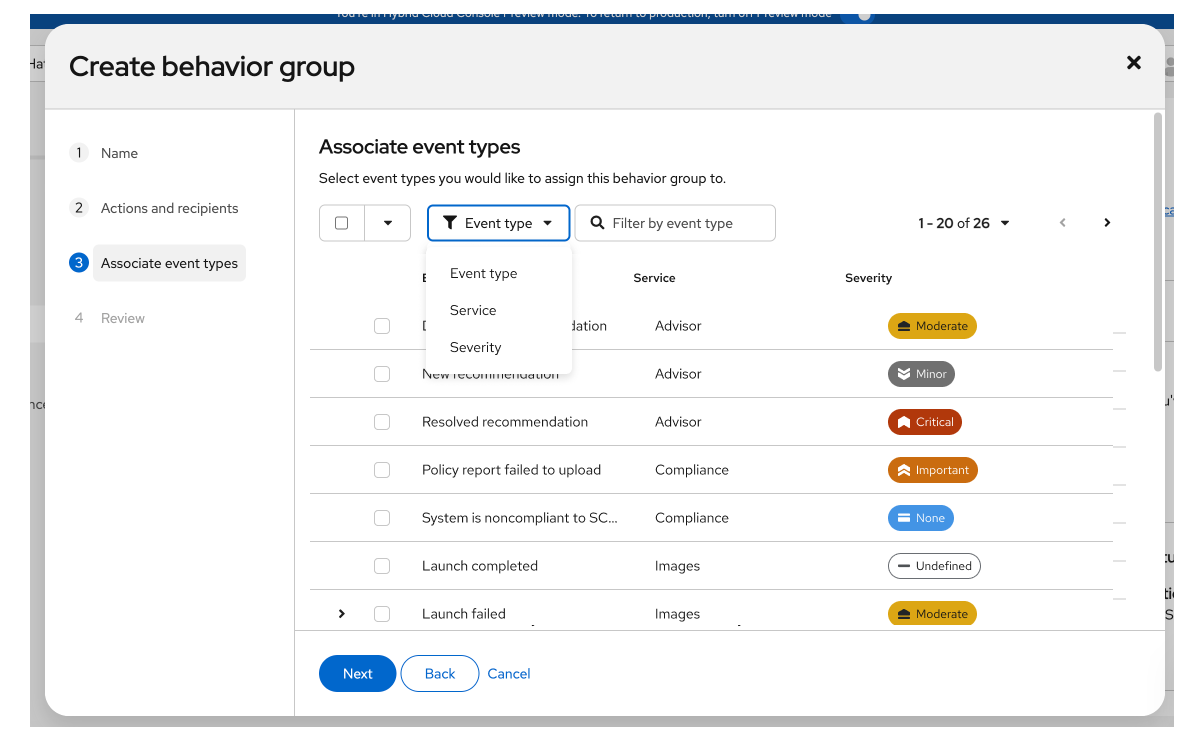
Summary: In the behavior group wizard, on the “Associate event types” step, users can filter event types by severity and see each event type’s severity in the table.
Acceptance criteria:
- A Severity filter is available in the Associate event types toolbar
- Severity Column in table
- Column shows the value (CRITICAL, IMPORTANT, MODERATE, LOW, NONE, UNDEFINED).
- Severity is shown with a consistent visual (label) and matches the design system https://www.patternfly.org/patterns/status-and-severity/#severity-icons
https://www.patternfly.org/components/label#filled-labels - When the API omits severity, the cell shows a defined fallback (e.g. “—” + “Undefined”) and does not break the table.
- Loading and error states for the Associate event types step remain correct when severity filter/column are present.
- Accessible (labels, keyboard, screen readers) and localized where applicable.
- Add storybook test