-
Bug
-
Resolution: Done
-
 Minor
Minor
-
6.0.0
-
None
Description of problem:
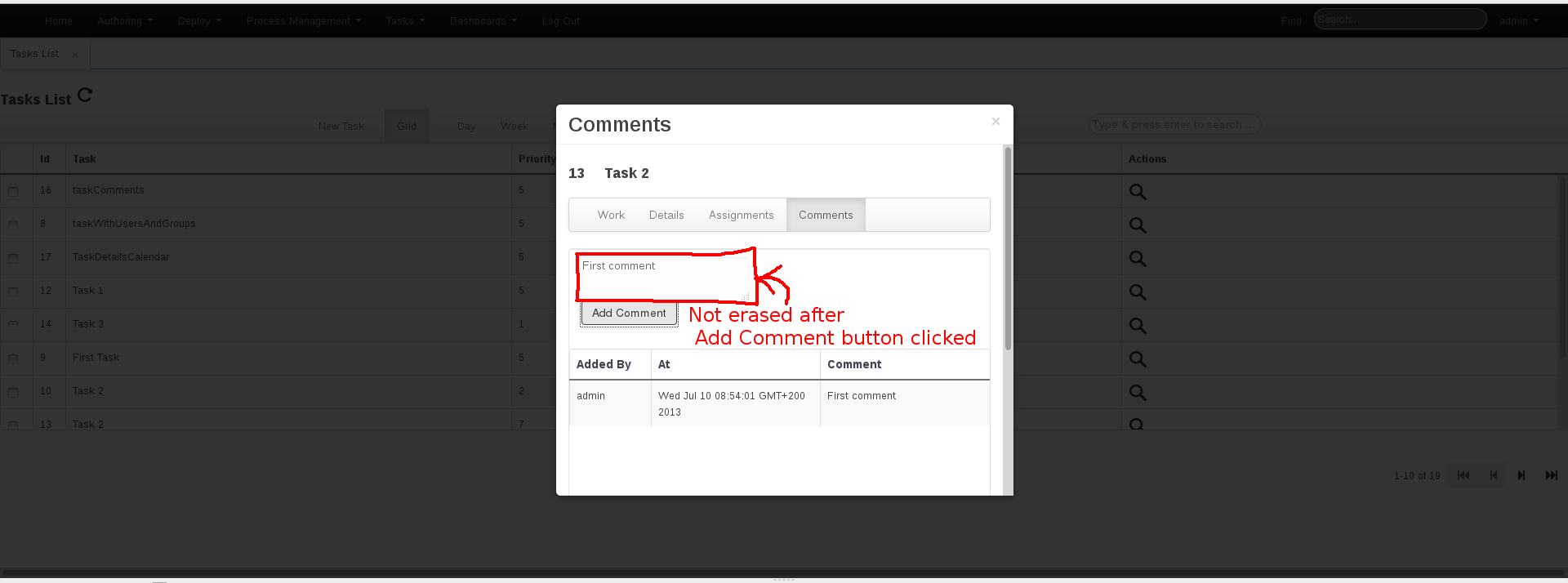
When adding comment for a task in Tasks List, the input area for comment is not erased after comment is added using Add Comment button (see screenshot attached).
Version-Release number of selected component (if applicable):
6.0.0. Beta5
How reproducible:
Always
Steps to Reproduce:
1. Navigate to Tasks > Tasks List
2. Add a task using New Task
3. Using Details (magnifying glass icon) navigate to Comments modal.
4. Fill in some Comment in the input text area
5. Press Add Comment button
Actual results:
The comment is added, but the comment also remains in the input text area. If user wants to add next comment, he has to manually delete the previous comment in the text aread.
Expected results:
The comment should be added + also deleted in the comment input text area, so that it is ready in case user wants to add new comments.
Additional info: