-
Bug
-
Resolution: Done
-
 Minor
Minor
-
6.0.0
-
None
Description of problem:
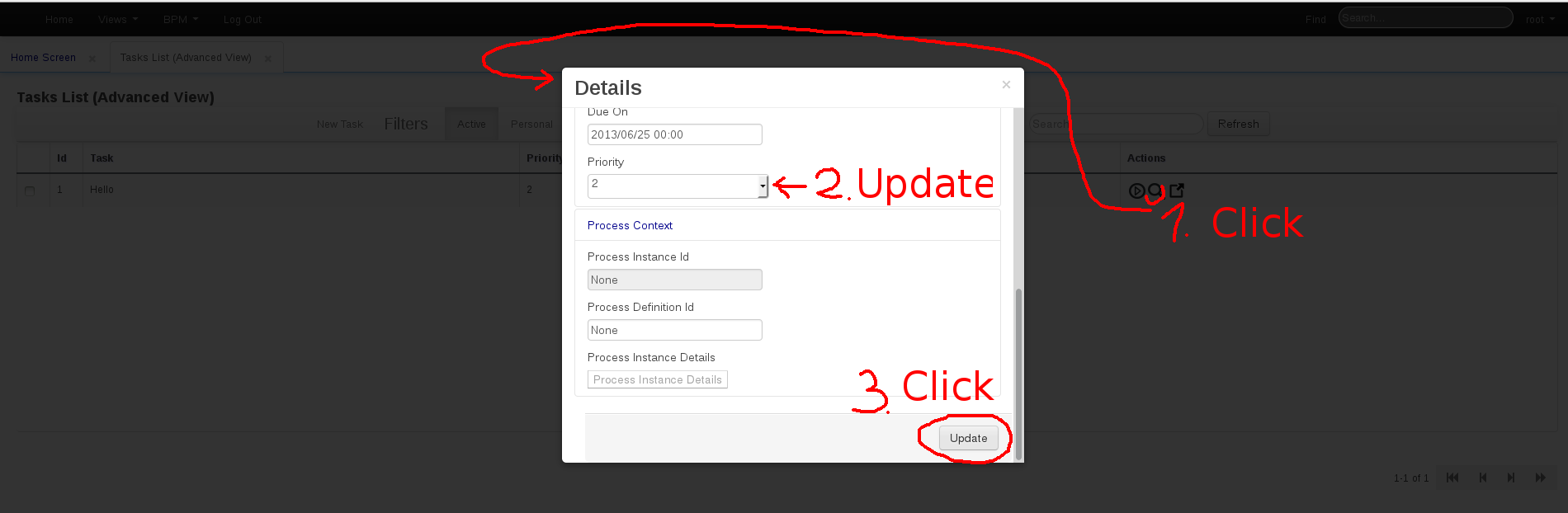
The modal dialog for viewing/updating task details doesn't disappear after clicking its "Update" button.
Version-Release number of selected component (if applicable):
jBPM console DR5 deployed on JBoss EAP 6.1
How reproducible:
Always
Steps to Reproduce:
1. Navigate to BPM > Tasks - Grid View (Advanced view)
2. Click "New Task" - just fill in some task name and click "Create"
3. Details for the newly created task (the magnifying glass icon)
4. Fill in some new values (e.g. Description, change priority etc.)
5. Scroll down and click "Update"
Actual results:
The Details window remains open. Even though task details ARE updated the change is not reflected in the GUI (you must close the modal dialog by "x" and then refresh the page)
Expected results:
After "Update" is clicked, the Modal dialog should disappear and the task details displayed in the Task list should be updated in the GUI.
Additional info:
See Screenshot