-
 Task
Task
-
Resolution:
Done
-
 Undefined
-
-
None
-
None
-
-
Product / Portfolio Work
-
-
-
-
-
-
-
-
Sprint 271, Sprint 272
Prerequisites
- Install LokiOperator and CLO with OTEL support
- Install COO with the logging UI schema configuration feature
- Patch COO image with a development image from the plugin that contains the OTEL features
Test Cases
1. ViaQ schema
- Set the schema field in the UIPlugin CR to via-q
- Verify that there is no dropdown shown to choose a schema
- Check that the histogram renders correctly with severity colors
- Check that the table shows results with severity colors
- By using all the UI Filter components
- Check that the filter is applied in the LogQL query and has the correct semantic in the labels
- Check that results are filtered correctly
2. OTEL schema
- Set the schema field in the UIPlugin CR to otel
- Verify that there is no dropdown shown to choose a schema{}
- Check that the histogram renders correctly with severity colors, this query should not include json parsing
- Check that the table shows results with severity colors, this query should not include json parsing
- By using all the UI Filter components
- Check that the filter is applied in the LogQL query and has the correct semantic in the labels, this query should not include json parsing
- Check that results are filtered correctly
3. Schema Dropdown
- Unset the schema configuration in the UIPlugin CR
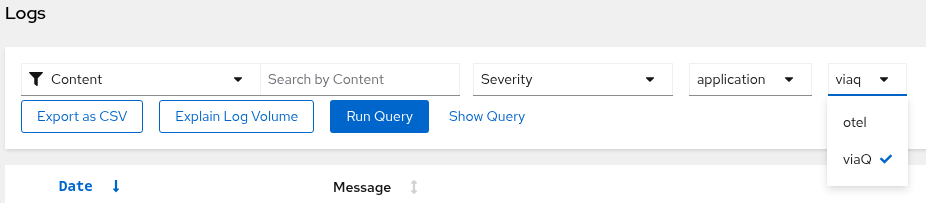
- Verify that a dropdown is shown allowing to choose between ViaQ and OTEL schemas
- When selecting ViaQ, run Test case #1
- When selecting OTEL, run Test case #2