-
Bug
-
Resolution: Cannot Reproduce
-
 Critical
-
None
-
4.13.0
-
Quality / Stability / Reliability
-
False
-
-
None
-
Critical
-
No
-
None
-
None
-
Rejected
-
Agent Sprint 233
-
1
-
None
-
None
-
None
-
None
-
None
-
None
-
None
Description of problem:
OCP 4.13 (RHEL 9.2/CentOS 9 Stream based) nightly deployments not succeeding on Dell R740 servers. Same deployment configuration works fine on OCP 4.12 (RHEL 8.6 based)

Hybrid cluster nodes: 3x virtual masters, 1x virtual worker, 1x baremetal worker.

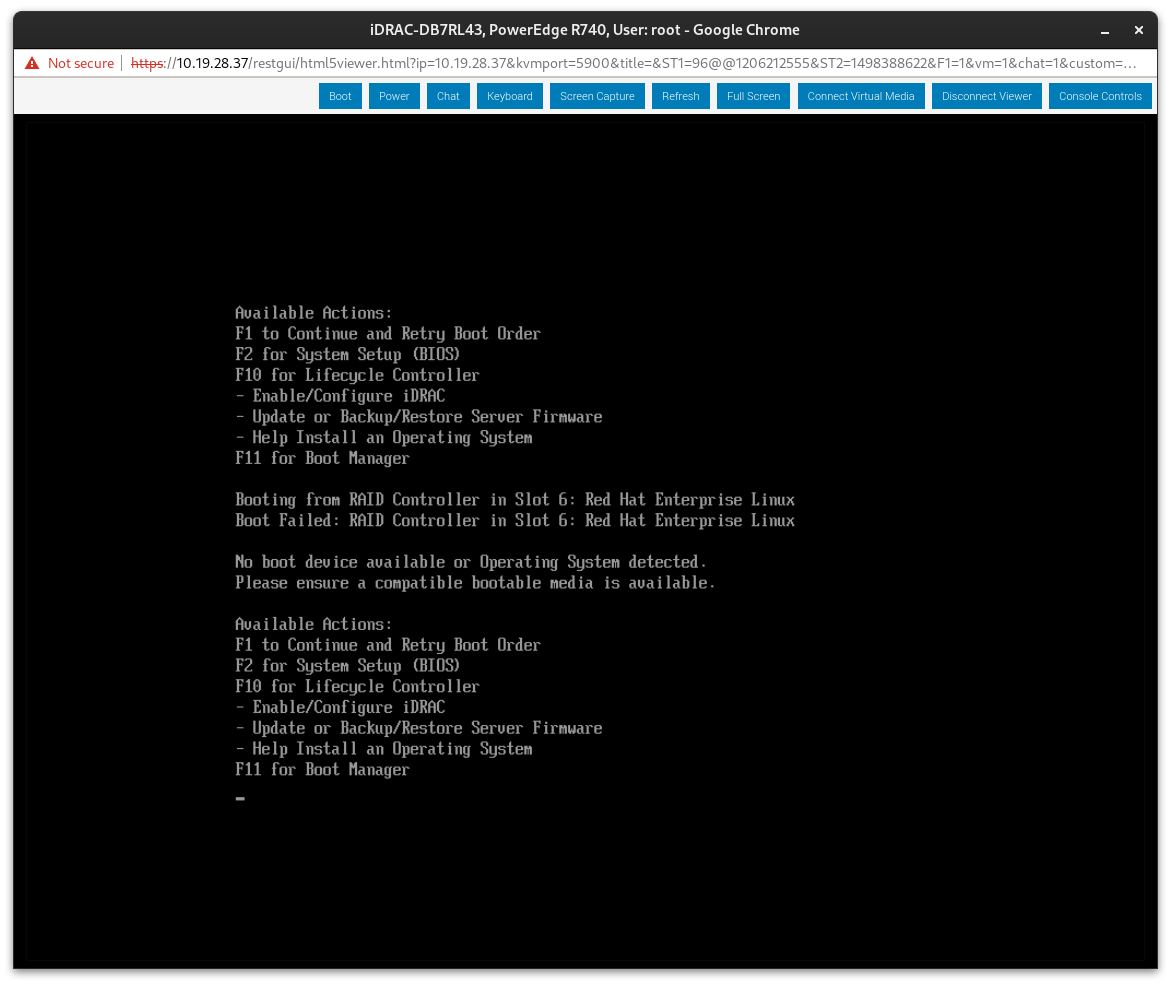
All nodes except the baremetal worker (cnfdc8-worker-1) were rebooted and booted from the installed operating system. Node worker-1 fails to boot from the RAID controller (see attached screenshot).

Also attached: must-gather and full outpuf of 'openshift-install agent wait-for install-complete'

# oc get nodes
NAME              STATUS   ROLES                  AGE     VERSION
cnfdc8-master-0   Ready    control-plane,master   5h5m    v1.26.2+dc93b13
cnfdc8-master-1   Ready    control-plane,master   5h34m   v1.26.2+dc93b13
cnfdc8-master-2   Ready    control-plane,master   5h34m   v1.26.2+dc93b13
cnfdc8-worker-0   Ready    worker                 5h13m   v1.26.2+dc93b13
Version-Release number of selected component (if applicable):
4.13.0-0.nightly-2023-03-23-204038
How reproducible:
Steps to Reproduce:
1.
2.
3.
Actual results:
/root/bin/openshift-install agent wait-for install-complete --log-level debug --dir cnfdc8

[...]
DEBUG Still waiting for the cluster to initialize: Working towards 4.13.0-0.nightly-2023-03-23-204038: 617 of 840 done (73% complete)
DEBUG Still waiting for the cluster to initialize: Cluster operators authentication, console, kube-apiserver, machine-api, monitoring are not available
DEBUG Still waiting for the cluster to initialize: Cluster operators authentication, console, kube-apiserver, machine-api, monitoring are not available
DEBUG Still waiting for the cluster to initialize: Cluster operators authentication, kube-apiserver, machine-api, monitoring are not available
DEBUG Still waiting for the cluster to initialize: Cluster operators authentication, machine-api, monitoring are not available
DEBUG Still waiting for the cluster to initialize: Cluster operators machine-api, monitoring are not available
ERROR Cluster installation timed out: context deadline exceeded
INFO Cluster operator baremetal Disabled is False with :
INFO Cluster operator cloud-controller-manager TrustedCABundleControllerControllerAvailable is True with AsExpected: Trusted CA Bundle Controller works as expected
INFO Cluster operator cloud-controller-manager TrustedCABundleControllerControllerDegraded is False with AsExpected: Trusted CA Bundle Controller works as expected
INFO Cluster operator cloud-controller-manager CloudConfigControllerAvailable is True with AsExpected: Cloud Config Controller works as expected
INFO Cluster operator cloud-controller-manager CloudConfigControllerDegraded is False with AsExpected: Cloud Config Controller works as expected
ERROR Cluster operator cluster-autoscaler Degraded is True with MissingDependency: machine-api not ready
INFO Cluster operator etcd RecentBackup is Unknown with ControllerStarted: The etcd backup controller is starting, and will decide if recent backups are available or if a backup is required
INFO Cluster operator ingress Progressing is True with Reconciling: ingresscontroller "default" is progressing: IngressControllerProgressing: One or more status conditions indicate progressing: DeploymentRollingOut=True (DeploymentRollingOut: Waiting for router deployment rollout to finish: 1 of 2 updated replica(s) are available...
INFO ).
ERROR Cluster operator ingress Degraded is True with IngressDegraded: The "default" ingress controller reports Degraded=True: DegradedConditions: One or more other status conditions indicate a degraded state: DeploymentReplicasAllAvailable=False (DeploymentReplicasNotAvailable: 1/2 of replicas are available)
INFO Cluster operator ingress EvaluationConditionsDetected is False with AsExpected:
INFO Cluster operator insights ClusterTransferAvailable is False with NoClusterTransfer: no available cluster transfer
INFO Cluster operator insights Disabled is False with AsExpected:
INFO Cluster operator insights SCAAvailable is True with Updated: SCA certs successfully updated in the etc-pki-entitlement secret
ERROR Cluster operator kube-controller-manager Degraded is True with GarbageCollector_Error: GarbageCollectorDegraded: error fetching rules: Get "https://thanos-querier.openshift-monitoring.svc:9091/api/v1/rules": dial tcp: lookup thanos-querier.openshift-monitoring.svc on 172.30.0.10:53: no such host
INFO Cluster operator machine-api Progressing is True with SyncingResources: Progressing towards operator: 4.13.0-0.nightly-2023-03-23-204038
ERROR Cluster operator machine-api Degraded is True with SyncingFailed: Failed when progressing towards operator: 4.13.0-0.nightly-2023-03-23-204038 because minimum worker replica count (2) not yet met: current running replicas 1, waiting for [cnfdc8-zbkmg-worker-0-44t59]
INFO Cluster operator machine-api Available is False with Initializing: Operator is initializing
INFO Cluster operator monitoring Available is False with UpdatingPrometheusOperatorFailed: reconciling Prometheus Operator Admission Webhook Deployment failed: updating Deployment object failed: waiting for DeploymentRollout of openshift-monitoring/prometheus-operator-admission-webhook: got 1 unavailable replicas
ERROR Cluster operator monitoring Degraded is True with UpdatingPrometheusOperatorFailed: reconciling Prometheus Operator Admission Webhook Deployment failed: updating Deployment object failed: waiting for DeploymentRollout of openshift-monitoring/prometheus-operator-admission-webhook: got 1 unavailable replicas
INFO Cluster operator monitoring Progressing is True with RollOutInProgress: Rolling out the stack.
INFO Cluster operator network ManagementStateDegraded is False with :
ERROR Cluster initialization failed because one or more operators are not functioning properly.
ERROR                           The cluster should be accessible for troubleshooting as detailed in the documentation linked below,
ERROR                           https://docs.openshift.com/container-platform/latest/support/troubleshooting/troubleshooting-installations.html
Expected results:
Additional info: