-
Bug
-
Resolution: Unresolved
-
 Minor
Minor
-
None
-
None
-
None
-
Quality / Stability / Reliability
-
False
-
-
False
-
-
-
OCMUI Team Sprint 283
Environment: stage or prod
Url: Cluster List → Any cluster actions → Edit Machine Pool
Browser: All browsers
OS: All
Priority: Minor
Reproduction steps:
- Navigate to Cluster List page (/openshift)
- Find any cluster with machine pools
- Click on the actions menu (kebab menu) for a cluster
- Select "Edit machine pool"
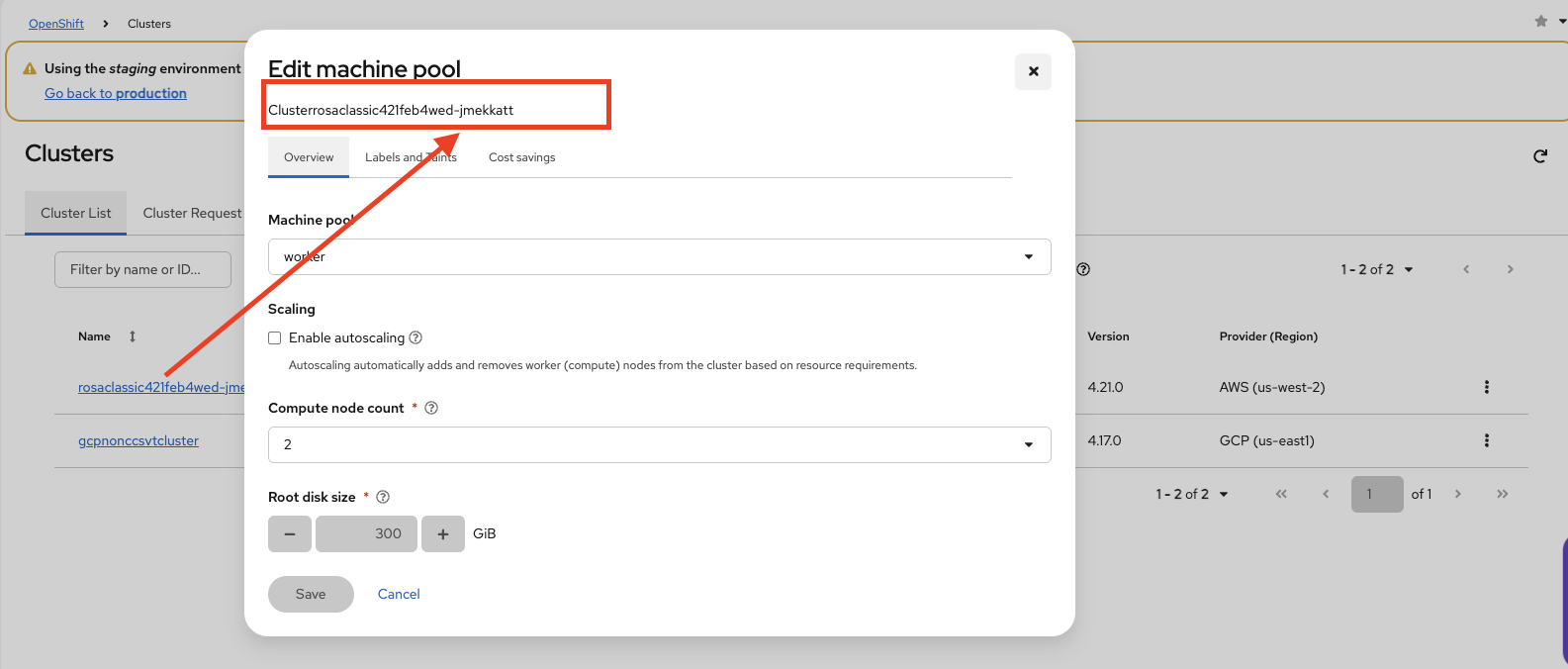
- Observe the dialog header where "Cluster" label and cluster name are displayed
Current Result:
- The "Cluster" label text overlaps with the cluster name value
- Text appears merged/concatenated without proper spacing
- Example: "ClusterMy-Cluster-Name" instead of "Cluster: My-Cluster-Name"
Expected Result:
- "Cluster" label and cluster name should be properly spaced
- Should display as "Cluster: {cluster-name}" or "Cluster {cluster-name}" with clear visual separation