-
Bug
-
Resolution: Unresolved
-
 Normal
-
None
-
None
-
None
-
Quality / Stability / Reliability
-
False
-
-
True
-
-
Environment: Staging
URL:https://console.dev.redhat.com/openshift/cluster-request > Open any access request
Browser: All
OS: All
Priority: Medium
Reproduction Steps:
- Navigate to Cluster Requests page (/cluster-request)
- In the "Cluster access requests" section, find any access request
- Click the "Open" button to open the Access Request Details modal
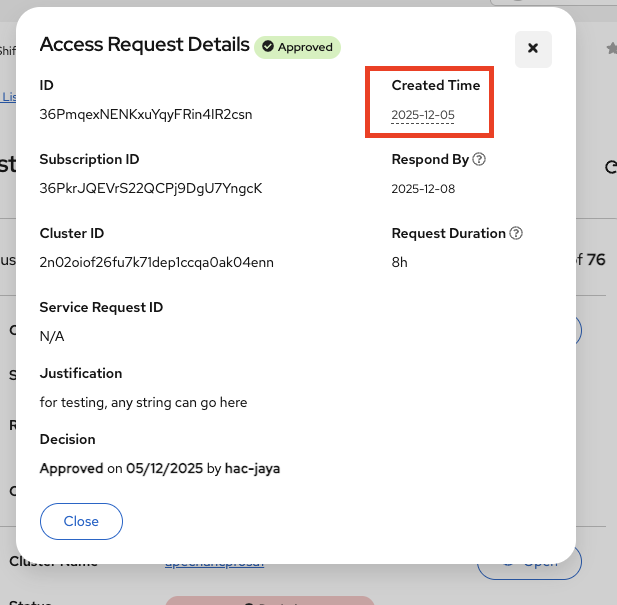
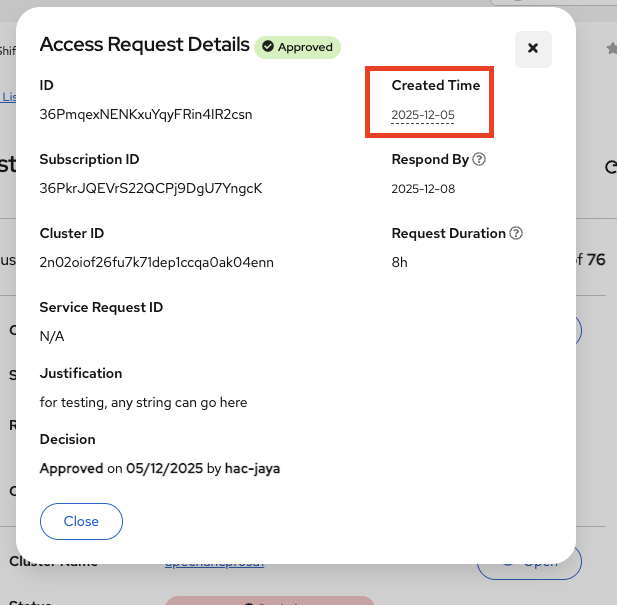
- Look at the "Created Time" field on the right side of the modal
Current Result:
- Label displays: "Created Time"
- Value shows only the date: "2025-12-05"
- No time component is displayed despite the label saying "Time"
Expected Result:
Option A: Show both date AND time to match the label:
- "2025-12-05, 14:30:00 UTC"
Option B: Rename the label to match the displayed value:
- Change label from "Created Time" to "Created Date"
See attached screenshot