 Normal
 Description of problem:
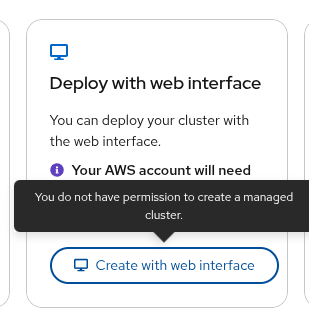
Wrong tootlip when hovering over Create with web interface active button
How reproducible:
always
Steps to Reproduce:
- Open OCM UI staging
- Go to openshift/create/rosa/getstarted
- Scroll down at the "Deploy the cluster and set up access" section
- Hover with mouse over Create with web interface button
- Observe what tooltip text is
Actual results:
There is tooltip saying user doesn't have permission, even tho button is enabled and clickable
Expected results:
Button either should be disabled in case of user really doesn't have permission or in case user have permissions, tooltip shouldn't be there. Another option is to change tooltip text
- duplicates
-
OCMUI-3549 Tooltip incorrectly informs users they do not have access to create a cluster
-

- Closed
-

