-
Bug
-
Resolution: Unresolved
-
 Major
Major
-
None
-
None
-
Quality / Stability / Reliability
-
True
-
-
False
-
-
Description of the Problem
Currently OCM UI restricted users from creating an HTPasswd IDP username with whitespaces. For example "jaya testing". Unfortunalty this is not aligned the ROSA CLI definition. i.e. ROSA CLI still support users from creating an HTPasswd IDP username with whitespaces. See the example below.
% rosa create idp -c popies-testing-2ndapril-ocmui
W: The current version (1.2.51) is not up to date with latest rosa cli released version (1.2.52).
W: It is recommended that you update to the latest version.
I: Interactive mode enabled.
Any optional fields can be left empty and a default will be selected.
? Type of identity provider (default = 'github'): htpasswd
? Identity provider name: htpasswd-1
? Configure users from HTPasswd file (optional):
I: At least one valid user and password is required to create the IDP.
? Username: jaya testing
? Password: [? for help] ***************
I: Configuring IDP for cluster 'popies-testing-2ndapril-ocmui'
I: Identity Provider 'htpasswd-1' has been created.
   It may take several minutes for this access to become active.
   To add cluster administrators, see 'rosa grant user --help'.
I: To log in to the console, open https://console-openshift-console.apps.k1k1g4x0m9m2a0i.suvd.s1.devshift.org and click on 'htpasswd-1'.
? Add another user: No
UI behavior should be aligned appropriately with ROSA CLI. As a consequence of this,
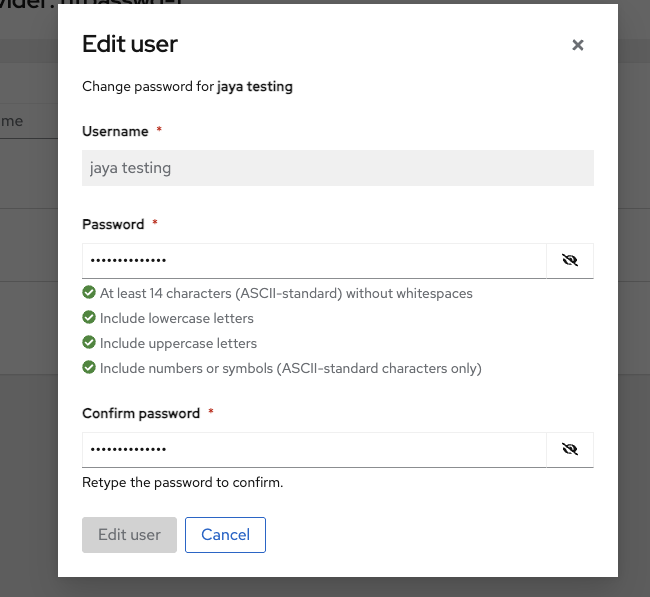
A username having white spaces can't be allowed to change the password from HTPasswd IDP page. The "Edit user" button is always disabled for such users from the model
See below:-
Steps to Reproduce:
- Open the OCM UI staging.
- Select a ready rosa cluster.
- Run the "rosa create idp" command against the cluster.
- Add a new HTPasswd IDP with a username contains whitespace (as mentioned in description)
- Go to OCM UI and navigate to cluster's Access control tab.
- Select newly added HTPasswd IDP and click kebab icon.
- Click "Edit" context menu.
- Select the username and click kebab icon associated to the same.
- Click "Change password" context menu.
- Input suggested password definition from both password fields
- Observe the behavior of "Edit user" button.
Actual Results:
"Edit user" button disabled from the model and user can't change the password for the same user when the username contains whitespace.
Expected results:
The support for whitespace (or any characters) in usernames should be aligned between both the OCM UI and the ROSA CLI. Currently, the ROSA CLI allows usernames with whitespace, while the OCM UI does not. This discrepancy is causing the issue described above and needs to be addressed.
Usernames with whitespace should be allowed to change their passwords without any issues from UI.