-
Bug
-
Resolution: Done
-
 Normal
-
None
-
None
-
Quality / Stability / Reliability
-
False
-
-
False
-
-
-
OCMUI Core Sprint 271, OCMUI Core Sprint 272
Description of problem:
During cluster creation via the wizard, when the user specifies longer node label definitions, such as when both the key and value character lengths are at the maximum (i.e., 64), the representation of the node definition in the 'Review and Create' step does not fit on the page. The alignment appears distorted, as shown below
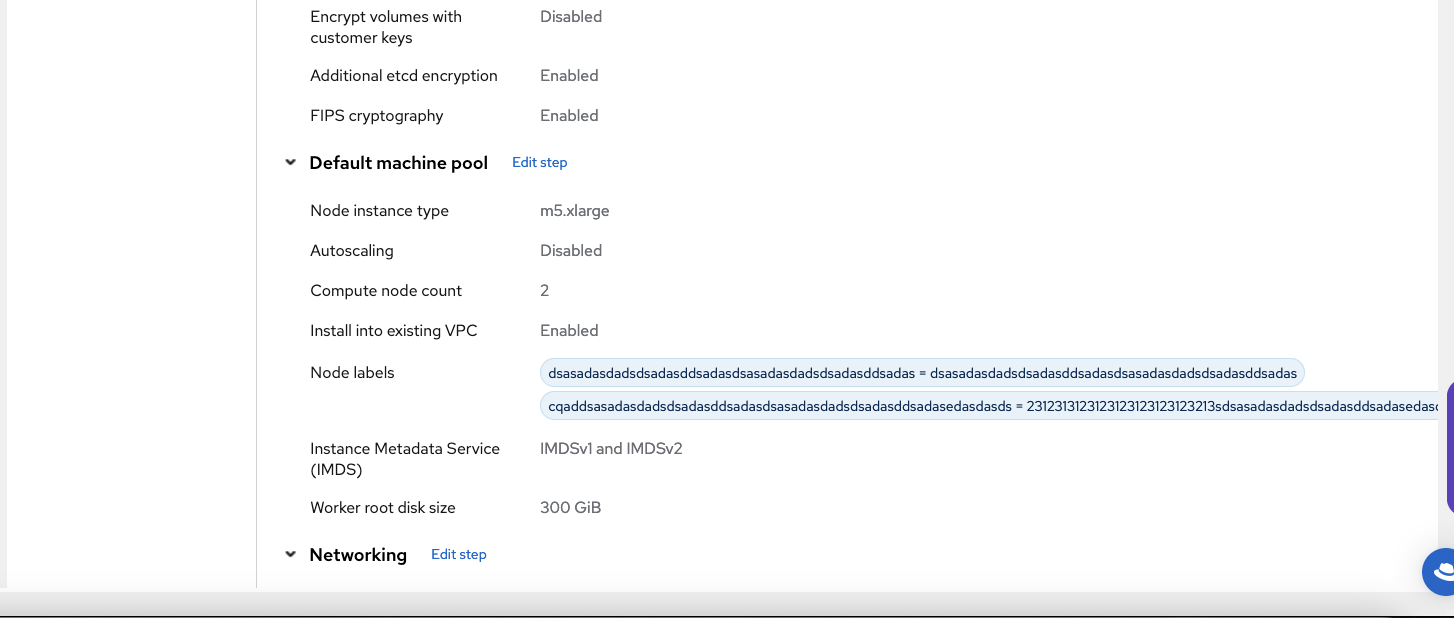
How reproducible:
always
Steps to Reproduce:
- Open OCM UI staging
- Launch ROSA wizard (Classic flow).
- Reach to default machine pool step and input the node labels i.e. keep the 64 character length string as part of key and value field .
- Proceed to next steps and reach to "Review and create" step.
- Review the node label definitions
the same issue appears in ROSA's no-proxy domains.
Actual results:
The node label definitions were not fit to the "Review and create" step.
Expected results:
The node label definition should fit properly (probably trim the content) to the page along with the existing "review and create" definitions
- links to


