Uploaded image for project: 'OCMUI - OpenShift Cluster Manager UI'
  1. OCMUI - OpenShift Cluster Manager UI
  2. OCMUI-1411

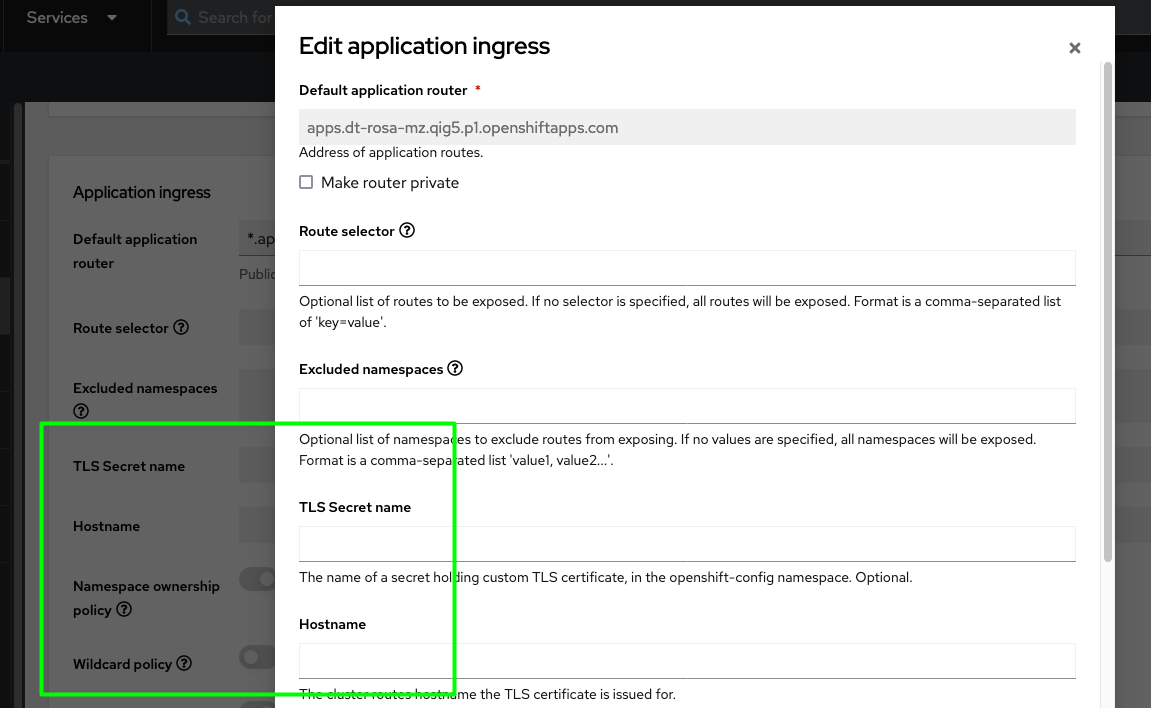
[OCM-UI] TLS Secret name and Hostname fields are missing on Networking screen

XMLWordPrintable

    • Icon: Bug Bug
    • Resolution: Done
    • Icon: Major Major
    • None
    • None
    • Core UI
    • False
    • Hide

      None

      Show
      None
    • False

      Steps to Reproduce:

      1) Launch a ROSA classic/ Hypershift 4.14.10 cluster using the UI interface.
      2) Provide valid user inputs and navigate to the Networking tab
      3) On the Networking screen, choose the application ingress settings type as Custom.


      Expected Result
      All the fields( Route selector, Excluded namespaces, Namespace ownership policy, Wildcard policy) for the application ingress button should be shown  and editable to the user


      Actual Result
      TLS Secret name and Hostname fields are missing on the Day 1 application ingress fields. This issue is seen on both ROSA V1 and V2 wizards.
       

              Unassigned Unassigned
              lamarach@redhat.com LAKSHMI SHIVANTHI AMARACHINTHA
              LAKSHMI SHIVANTHI AMARACHINTHA LAKSHMI SHIVANTHI AMARACHINTHA
              Votes:
              0 Vote for this issue
              Watchers:
              2 Start watching this issue

                Created:
                Updated:
                Resolved: