-
Bug
-
Resolution: Done
-
 Normal
-
None
-
Quality / Stability / Reliability
-
False
-
-
True
-
-
Bug Fix
-
Done
-
-
-
Moderate
Description of problem:
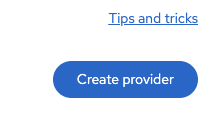
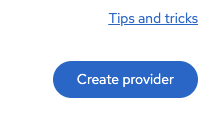
The ‘Tips and tricks’ link appears at the top of the button, which pushes all the content below it downward. If the top-right corner is reserved for an action button or another UI element, the link should be displayed on the left side instead.
Version-Release number of selected component (if applicable):
How reproducible:
Always / N%
Steps to Reproduce:
1. Install MTV
2. Navigate to all MTV pages
Expected results:
If the top-right corner is reserved for an action button or any other UI component, display the link on the left side instead (https://docs.google.com/document/d/1yFLTjFaCqzDtUFa4NlWO6pWzS3OsY81c9pU1IN7EOyU/edit?tab=t.0).

Additional info: