Uploaded image for project: 'Tools (JBoss Tools)'
  1. Tools (JBoss Tools)
  2. JBIDE-20984

Arquillian Cruiser view is in default JBDS or JBT installation if you use an old workspace with Arquillian projects

XMLWordPrintable

    • Icon: Bug Bug
    • Resolution: Done
    • Icon: Major Major
    • 4.4.0.Alpha1
    • 4.3.0.Final
    • upstream
    • None
    • Hide

      1. Install JBDS
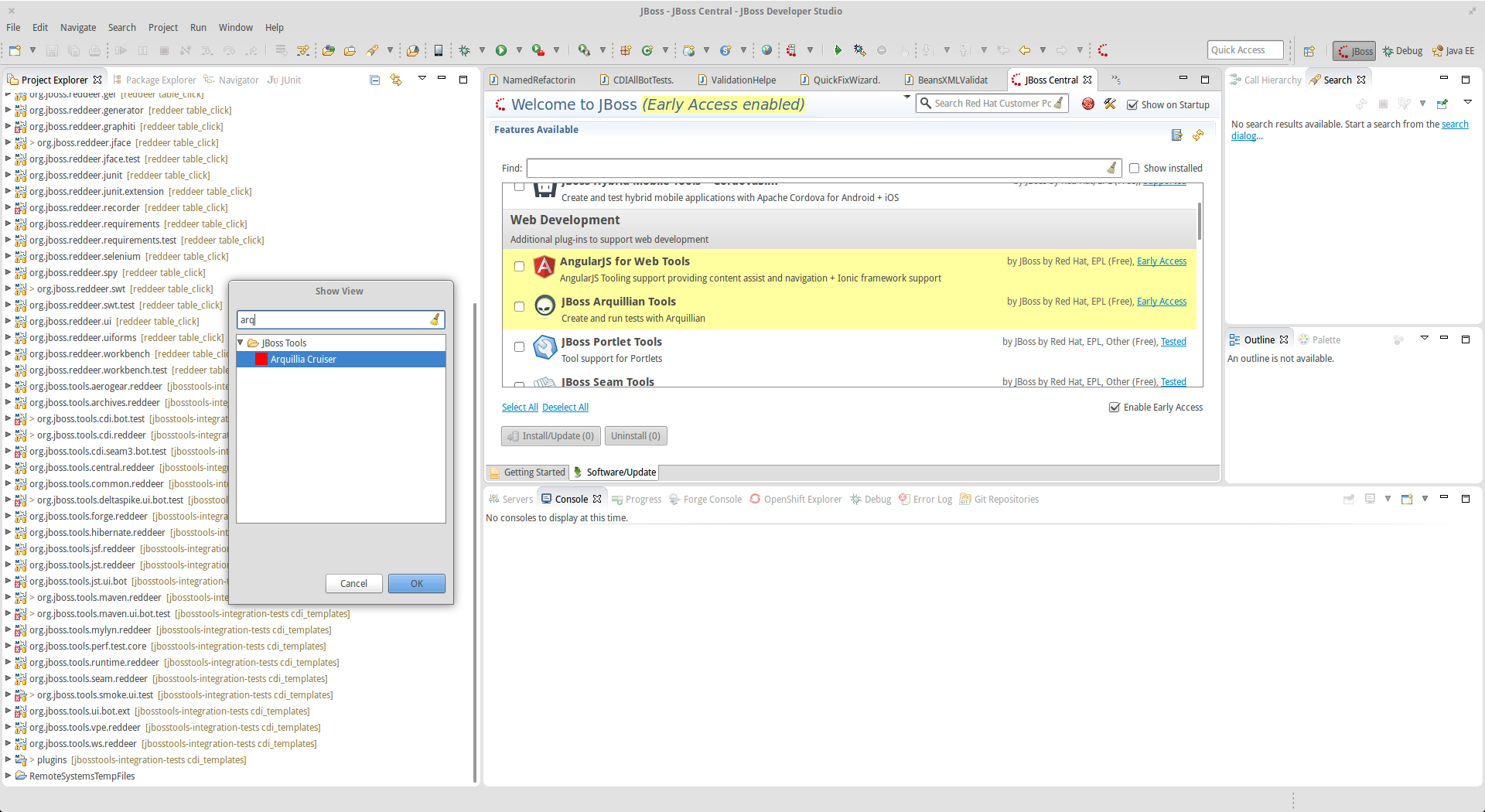
      2. Open Window - Show new - Other..
      3. find Arquillia Cruiser

      Show
      1. Install JBDS 2. Open Window - Show new - Other.. 3. find Arquillia Cruiser

      Default JBDS installation contains "Arquillia Cruiser" (missing n) view. Arquillian from central isn't installed. View is missing icon and does not work at all - if you try to open it you will get view with "Could not create the view: org.jboss.tools.arquillian.ui.views.arquillianView" text.
              snjeza_jira Snjezana Peco (Inactive)
              rawagner@redhat.com Rastislav Wagner
              Votes:
              0 Vote for this issue
              Watchers:
              4 Start watching this issue

                Created:
                Updated:
                Resolved: