Uploaded image for project: 'Tools (JBoss Tools)'
  1. Tools (JBoss Tools)
  2. JBIDE-11915

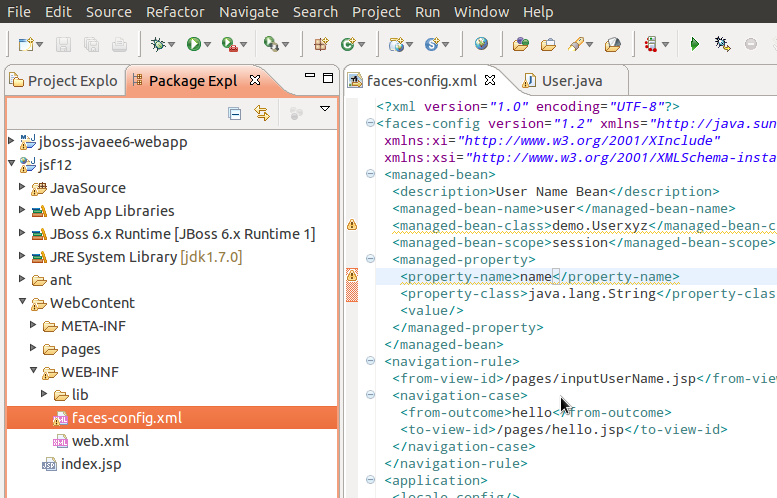
faces-config.xml with Warning is not decorated with Warning image within Package Explorer.

XMLWordPrintable

      1. Create JSF 1.2 Kickstart project
      2. Open faces-config.xml file
      3. Change managed bean name from demo.User to non existing class something like demo.Userxyz
      4. Warning marker appear in faces-config.xml file editor on the line with managed bean configuration
      Error: faces-config.xml is not decorated with Warning image within Package Explorer neither face-congig.xml editor is not decorated with Warning image.

        1. screen.png
          126 kB
          Alexey Kazakov

              scabanovich Viacheslav Kabanovich (Inactive)
              vpakan Vlado Pakan (Inactive)
              Votes:
              0 Vote for this issue
              Watchers:
              3 Start watching this issue

                Created:
                Updated:
                Resolved: