Uploaded image for project: 'Hawkular'
  1. Hawkular
  2. HAWKULAR-737

Disable links "Manage organizations" and "User settings" when using hawkular as an organization

XMLWordPrintable

    • Icon: Enhancement Enhancement
    • Resolution: Won't Do
    • Icon: Major Major
    • 1.0.0.Alpha7
    • None
    • None
    • None

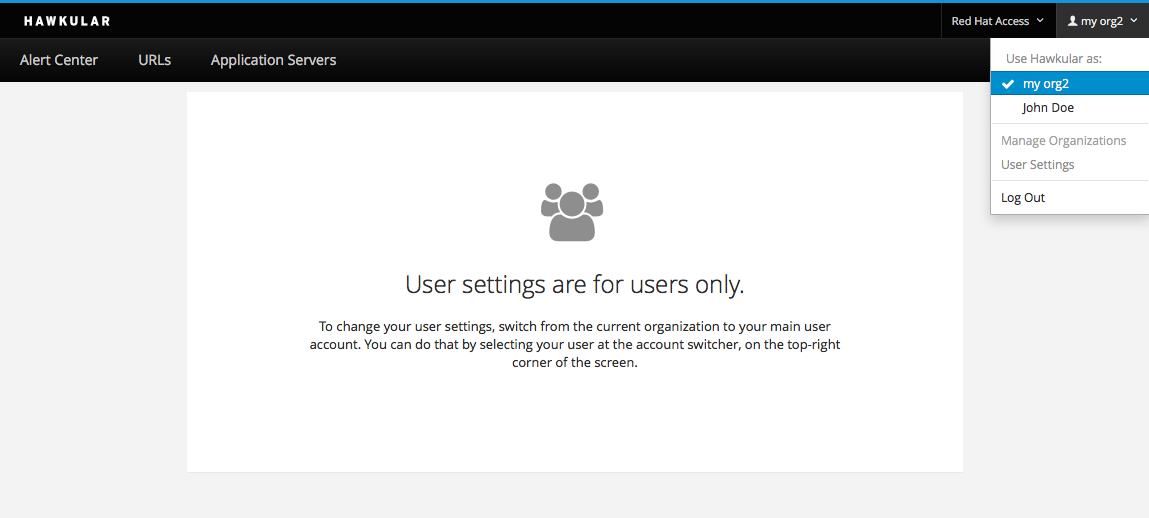
      Instead of taking the user to a screen and showing an error, we should avoid them to get there.
      So when using hawkular as an organization, we should disable "Manage organizations" and "User settings". Just add the class "disabled" in the <li> switch.
      Attached how it should look.
              jpkroehling@redhat.com Juraci Paixão Kröhling (Inactive)
              gcardoso_jira Gabriel Cardoso (Inactive)
              Votes:
              0 Vote for this issue
              Watchers:
              2 Start watching this issue

                Created:
                Updated:
                Resolved: