-
Bug
-
Resolution: Unresolved
-
 Minor
Minor
-
None
-
1.19.0
-
False
-
-
False
-
-
Description of Problem
When creating a new Argo CD instance, the ApplicationSet controller is not enabled by default although the description in the UI says it is.
Additional Info
When you create a new Argo CD instance in the OCP console, it gives the user the impression that the ApplicationSet controller is enabled by default:
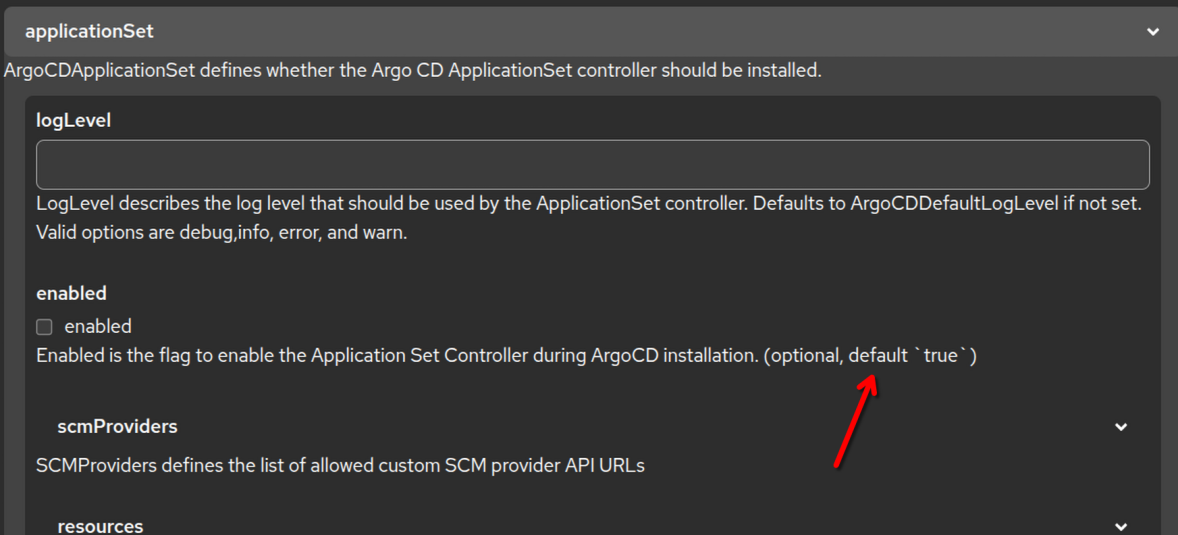
However, when not ticking the box or making any other change to the settings in .spec.applicationSet, the ApplicationSet controller will not be enabled.
This can also be reproduced with a YAML instead of going through the console.
At this point, I do not know whether it's intended behavior and the help text in the console is wrong, or if this is a bug.
User has to set at least
spec:
  applicationSet: {}
to make the ApplicationSet controller work in that particular instance.
Problem Reproduction
- Create a new ArgoCD instance on the cluster with all default settings
- Observe that ApplicationSet controller is not started and remains as "Unknown" in the ArgoCD CR's status
Reproducibility
- Always
Prerequisites/Environment
- Tested with latest GitOps 1.19.0
Steps to Reproduce
- See above
Expected Results
- ApplicationSet controller being started without explicit configuration
Actual Results
- ApplicationSet controller not being started without explicit configuration
Problem Analysis
- <Completed by engineering team as part of the triage/refinement process>
Root Cause
- <What is the root cause of the problem? Or, why is it not a bug?>
Workaround (If Possible)
- <Are there any workarounds we can provide to the customers?>
Fix Approaches
- <If we decide to fix this bug, how will we do it?>
Acceptance Criteria
- ...
Definition of Done
- Code Complete:
- All code has been written, reviewed, and approved.
- Tested:
- Unit tests have been written and passed.
- Ensure code coverage is not reduced with the changes.
- Integration tests have been automated.
- System tests have been conducted, and all critical bugs have been fixed.
- Tested and merged on OpenShift either upstream or downstream on a local build.
- Documentation:
- User documentation or release notes have been written (if applicable).
- Build:
- Code has been successfully built and integrated into the main repository / project.
- Midstream changes (if applicable) are done, reviewed, approved and merged.
- Review:
- Code has been peer-reviewed and meets coding standards.
- All acceptance criteria defined in the user story have been met.
- Tested by reviewer on OpenShift.
- Deployment:
- The feature has been deployed on OpenShift cluster for testing.