-
Bug
-
Resolution: Unresolved
-
 Undefined
-
None
-
None
-
None
-
False
-
-
False
-
-
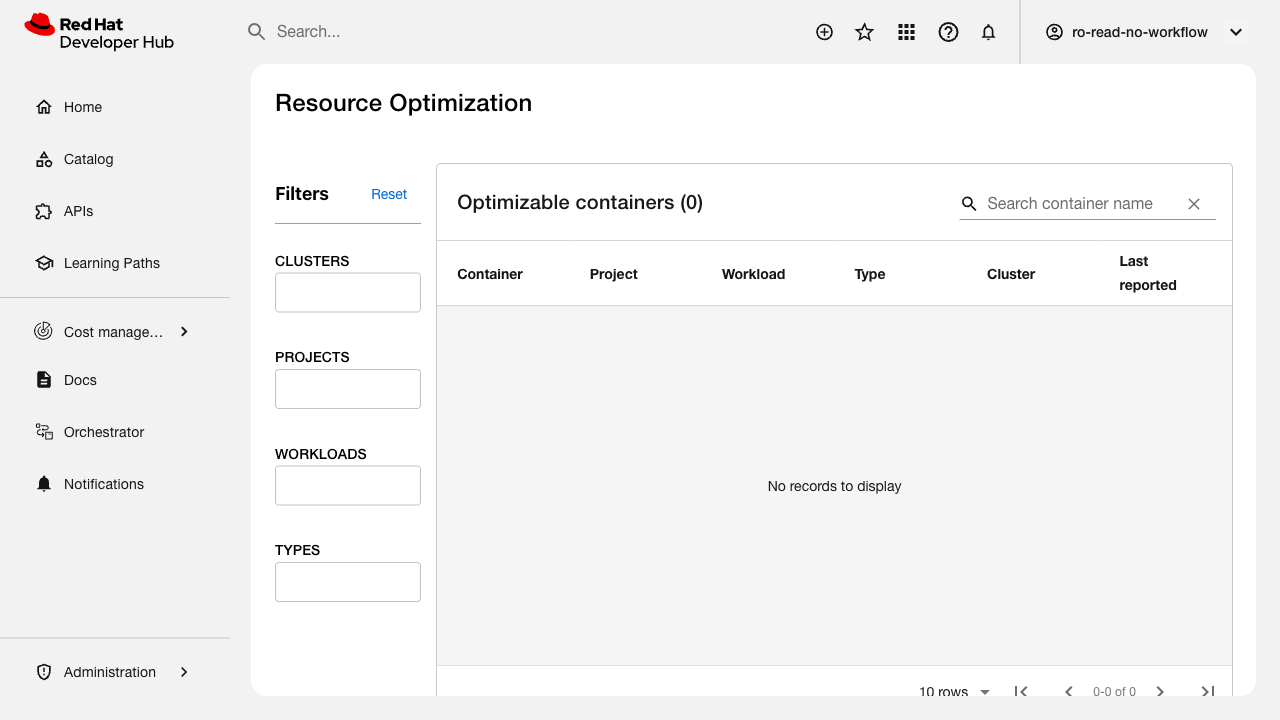
When the Resource Optimization plugin is configured with invalid hybrid cloud service account credentials (clientId/clientSecret), the UI silently shows an empty table with "No records to display" instead of displaying a clear error message about the authentication failure.
Expected:
- UI should display an error banner or message indicating that the hybrid cloud API authentication has failed
- The error should be actionable (e.g., "Unable to authenticate with the hybrid cloud console. Please check your service account credentials.")
Actual:
- UI shows "Optimizable containers (0)" and "No records to display"
- No error message, warning banner, or indication that anything is wrong
- User/admin cannot distinguish between "no data available" and "credentials are invalid"
Backend logs DO show errors:
redhat-resource-optimization error Request failed with status 500 Unauthorized
GET /api/redhat-resource-optimization/token HTTP/1.1 500
GET /api/proxy/cost-management/v1/recommendations/openshift 401
Steps to reproduce:
1. Configure ROS plugin with invalid clientId and clientSecret
2. Restart Backstage
3. Log in as a user with RORead permission
4. Navigate to Resource Optimization page
5. Observe empty table with no error message
Environment: RHDH 1.9.0, plugin version 1.3.2-rc.1
Related test cases: FLPATH-3119, FLPATH-3136
- blocks
-
FLPATH-3116 [Test Plan] Cost Management RHDH Plugin QA Testing for 1.9
-
- In Progress
-
-
FLPATH-3119 [Test Case] Verify clear error messages for invalid hybrid cloud SA credentials
-
- ON_DEV
-
-
-
- ON_DEV
-