-
Bug
-
Resolution: Unresolved
-
 Undefined
-
None
-
None
-
None
-
None
-
False
-
-
False
-
-
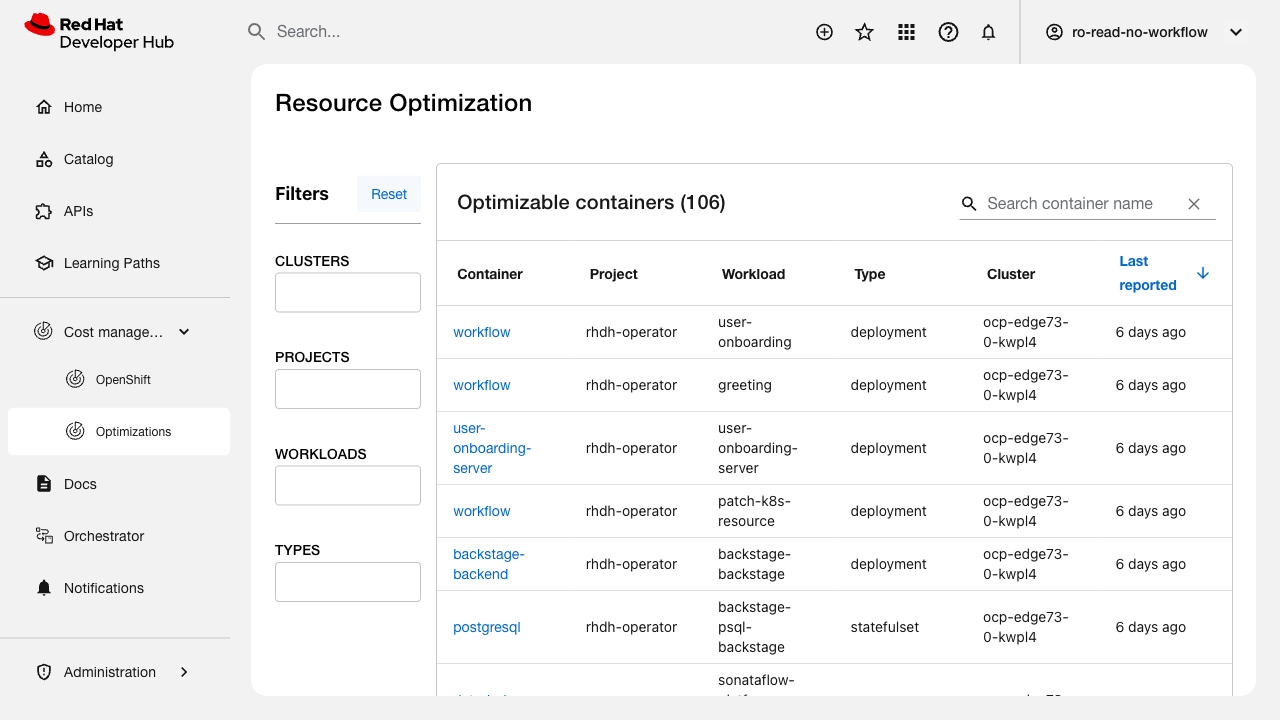
The Resource Optimization plugin filter controls (CLUSTERS, PROJECTS, WORKLOADS, TYPES) are present in the UI but the MUI Autocomplete dropdowns never populate with selectable options.
Steps to Reproduce:
1. Navigate to Cost Management > Optimizations in RHDH
2. Click on any of the 4 filter input fields (CLUSTERS, PROJECTS, WORKLOADS, TYPES)
3. Attempt to type partial text (e.g. "ocp" in CLUSTERS)
4. Observe that a popper element is created but the listbox/paper inside is always empty
Expected Result:
Each filter should display a dropdown list of available values from the loaded data (cluster names, project names, workload names, types) that users can select to narrow the table results.
Actual Result:
The autocomplete popper appears but is always empty. No filter options are displayed. Typing text does not trigger any option matching. The Reset button clears text input but there are no selectable options to apply.
Environment:
- RHDH 1.9.0 (Backstage 1.45.3)
- OCP Edge 73
- Plugin: red-hat-developer-hub.plugin-redhat-resource-optimization
- 106 optimizable containers loaded successfully (data is present)
Additional Notes:
The filter labels and input fields render correctly. The underlying MUI Autocomplete components are properly structured (role="combobox", aria-expanded attributes). The issue appears to be that the option lists are never populated from the API response data.
- blocks
-
FLPATH-3116 [Test Plan] Cost Management RHDH Plugin QA Testing for 1.9
-
- In Progress
-
- is blocked by
-
FLPATH-3125 [Test Case] Verify project filtering functionality
-
- ON_DEV
-