Uploaded image for project: 'Drools'
  1. Drools
  2. DROOLS-1899

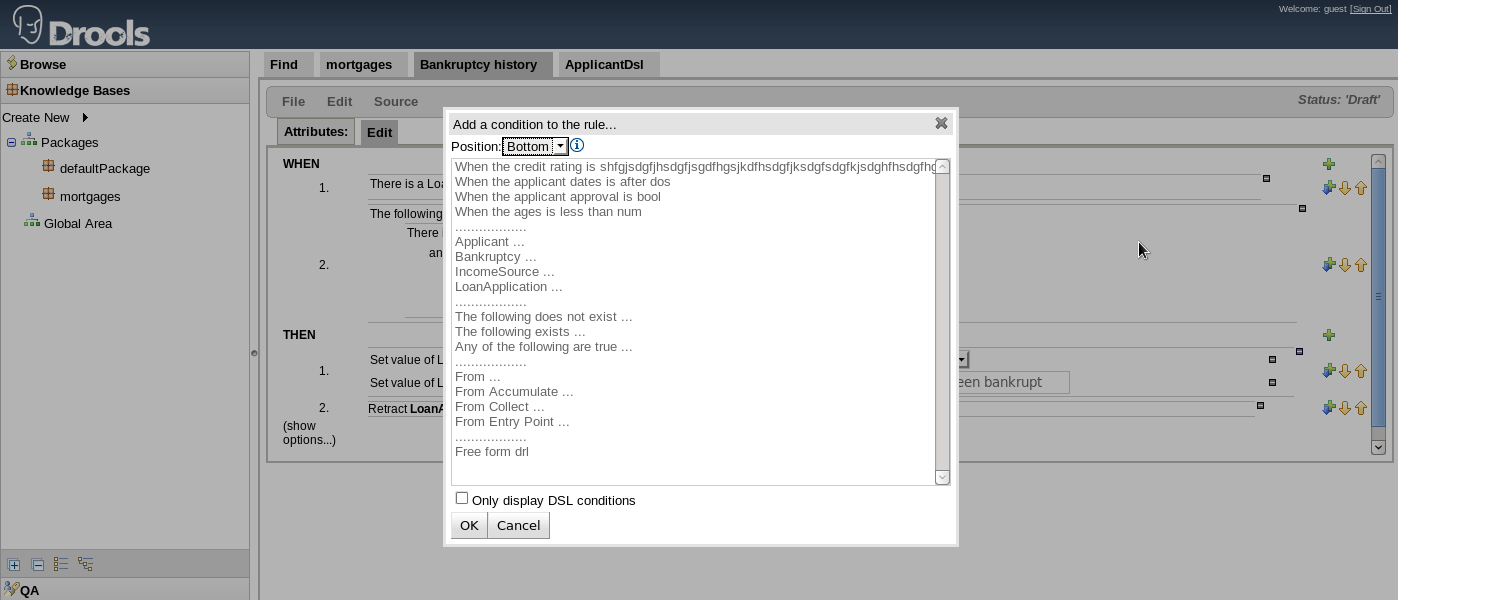
DSL View for use in business rules assets does not scroll to the right

XMLWordPrintable

    • Hide

      Steps to reproduce (example in mortgages project):
      1) In DSL Configurations, edit the file (eg. ApplicantDsl)
      2) Increase the text that will be displayed for business rule after the [when] tag ...
      e.g :

      [when]When the credit rating is shfgjsdgfjhsdgfjsgdfhgsjkdfhsdgfjksdgfsdgfkjsdghfhsdgfhgsfjksdgfshdjsgdfjkgsdjkfgasjkfhsdgfasgkausfsdfyhsukhfusdhfuteste

      {rating:ENUM:Applicant.creditRating} = applicant:Applicant(creditRating=="{rating}

      ")
      [then]Approve the loan = applicant.setApproved(true)

      3) Save the changes
      4) Go to Business Rule Assets and click on a rule
      5) Click on green plus on the right

      Show
      Steps to reproduce (example in mortgages project): 1) In DSL Configurations, edit the file (eg. ApplicantDsl) 2) Increase the text that will be displayed for business rule after the [when] tag ... e.g : [when] When the credit rating is shfgjsdgfjhsdgfjsgdfhgsjkdfhsdgfjksdgfsdgfkjsdghfhsdgfhgsfjksdgfshdjsgdfjkgsdjkfgasjkfhsdgfasgkausfsdfyhsukhfusdhfuteste {rating:ENUM:Applicant.creditRating} = applicant:Applicant(creditRating=="{rating} ") [then] Approve the loan = applicant.setApproved(true) 3) Save the changes 4) Go to Business Rule Assets and click on a rule 5) Click on green plus on the right

      I have created a set of DSL. The words end up being longer than the standard box that comes up when I try to use the DSL in a business rule assets.

      See the attached screenshot.
              docmrc97 Mark Coble (Inactive)
              rhn-support-ajuricic Amana Juricic
              Votes:
              0 Vote for this issue
              Watchers:
              2 Start watching this issue

                Created:
                Updated:
                Resolved: