-
Feature Request
-
Resolution: Unresolved
-
 Major
Major
-
None
-
False
-
-
False
-
-
Issue Summary
Request for UX enhancement in OpenShift DevSpaces to provide seamless user experience when workspace pods are rescheduled or restarted, eliminating disruptive error messages and manual reload requirements.
Current User Experience Problem
Current Behavior
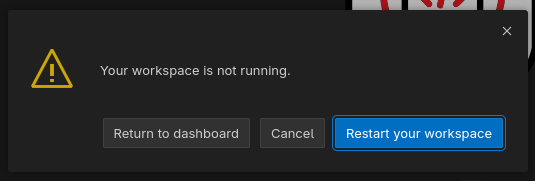
When a DevSpaces workspace pod is restarted or rescheduled to a different node, users experience:
- Connection Error: "Cannot reconnect. Please reload the window" popup
- Manual Intervention Required: User must manually reload the browser window
- Poor UX: No indication of what happened or why reconnection failed
Business Impact
- Developer Productivity: Interrupts coding workflow and concentration
- User Frustration: Unexpected errors without clear explanation
- Support Overhead: Users may report this as a "bug" or service issue
Enhancement Request
Desired Behavior
Instead of showing blocking error messages, DevSpaces should:
- Automatic Reconnection: Detect connection loss and attempt to reestablish connection in background
- Graceful Recovery: Automatically reload the VS Code client without user intervention
- User Notification: Show a non-intrusive notification (e.g., bottom-right corner) indicating:
- "Workspace restarted - connection restored"
- "Reconnecting to workspace..."
- Similar contextual messaging
Use Cases
This enhancement addresses common scenarios where pods restart:
- Node Maintenance: Scheduled node updates or maintenance
- Resource Constraints: Pod eviction due to resource pressure
- Infrastructure Updates: OpenShift cluster updates
- Auto-scaling Events: Node scaling operations
Expected Outcomes
* Seamless Experience: Users continue working without manual intervention - Reduced Support Tickets: Fewer user reports about "connection issues"
- Improved Adoption: Better user experience encourages DevSpaces usage
- Professional UX: Matches expectations from modern web applications
Business Justification
Improving the DevSpaces user experience will:
- Increase developer satisfaction and adoption
- Reduce support overhead and user confusion
- Align with enterprise-grade application expectations
- Enhance overall platform reliability perception