-
Bug
-
Resolution: Duplicate
-
 Critical
-
None
-
3.26.0.GA
-
False
-
-
False
-
-
Description of problem:
Workaround
Prerequisites (if any, like setup, operators/versions):
Steps to Reproduce
- Install Dev Spaces 3.26.0-RC.02.04
- Create workspaces from git url https://github.com/crw-qe/quarkus-api-example-public/tree/ubi8-latest using VS Code SSH Desktop Editor
Actual results:
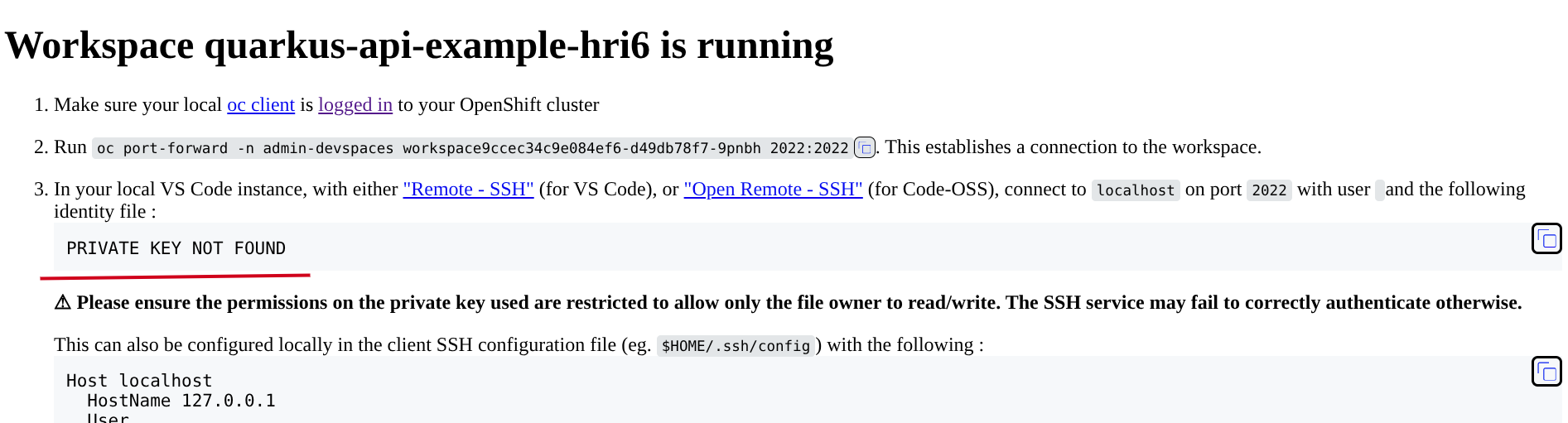
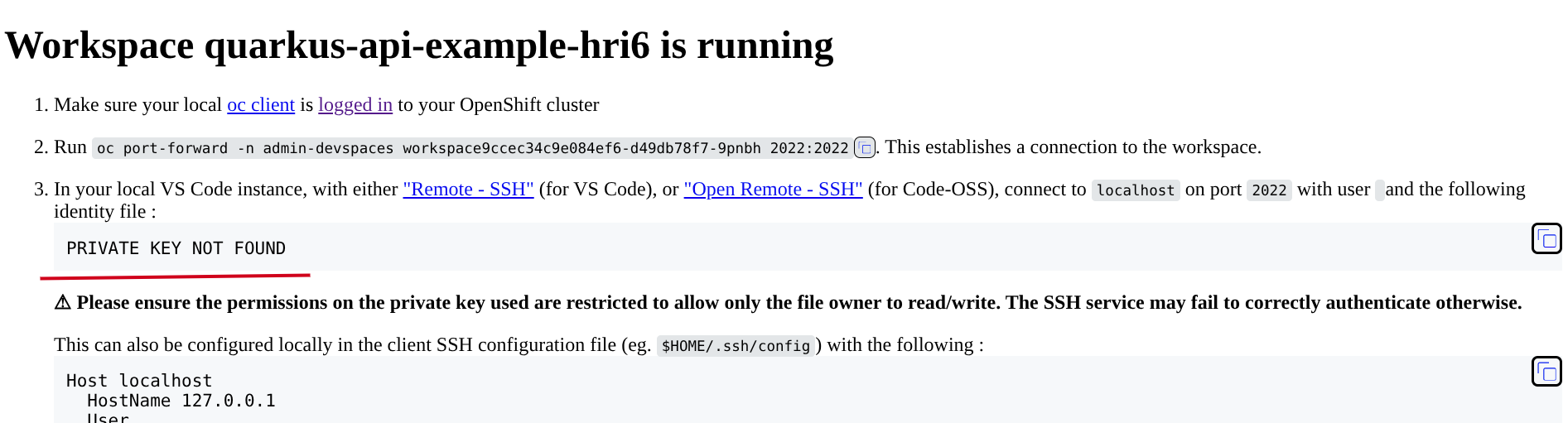
There was error message "PRIVATE KEY NOT FOUND" on landing page.
tools container image in workspace devfile.yaml: quay.io/devfile/universal-developer-image:ubi8-latest
schemaVersion: 2.3.0
metadata:
  generateName: quarkus-api-example
attributes:
  controller.devfile.io/storage-type: ephemeral
components:
  - name: tools
    container:
      image: quay.io/devfile/universal-developer-image:ubi8-latest
      env:
        - name: QUARKUS_HTTP_HOST
          value: 0.0.0.0
      endpoints:
        - exposure: none
          name: debug
          protocol: tcp
          targetPort: 5005
        - exposure: public
          name: list-all-food
          protocol: https
          targetPort: 8080
          path: /food
      volumeMounts:
        - name: m2
          path: /home/user/.m2
      memoryLimit: 6G
      memoryRequest: 512Mi
      cpuRequest: 1000m
      cpuLimit: 4000m
      mountSources: true
  - name: postgresql
    container:
      image: quay.io/centos7/postgresql-13-centos7@sha256:994f5c622e2913bda1c4a7fa3b0c7e7f75e7caa3ac66ff1ed70ccfe65c40dd75
      env:
        - name: POSTGRESQL_USER
          value: user
        - name: POSTGRESQL_PASSWORD
          value: password
        - name: POSTGRESQL_DATABASE
          value: food_db
        - name: PGDATA
          value: /tmp/pgdata
  - name: m2
    volume:
      size: 1G
commands:
  - id: package
    exec:
      label: Package
      component: tools
      workingDir: ${PROJECTS_ROOT}/quarkus-api-example
      commandLine: ./mvnw clean package -DskipTests=true
      group:
        kind: build
        isDefault: true
  - id: runtests
    exec:
      label: Run Tests
      component: tools
      workingDir: ${PROJECTS_ROOT}/quarkus-api-example
      commandLine: ./mvnw test
      group:
        kind: test
  - id: packagenative
    exec:
      label: Package Native
      component: tools
      workingDir: ${PROJECTS_ROOT}/quarkus-api-example
      commandLine: ./mvnw package -Dnative -Dmaven.test.skip -Dquarkus.native.native-image-xmx=3G
      group:
        kind: build
  - id: startdev
    exec:
      label: Start Development mode (Hot reload + debug)
      component: tools
      workingDir: ${PROJECTS_ROOT}/quarkus-api-example
      commandLine: ./mvnw compile quarkus:dev
      group:
        kind: run
        isDefault: true
  - id: startnative
    exec:
      label: Start Native
      component: tools
      workingDir: ${PROJECTS_ROOT}/quarkus-api-example/target
      commandLine: ./quarkus-api-example-1.0.0-SNAPSHOT-runner
      group:
        kind: run
  - id: buildimage
    exec:
      label: Build Image
      component: tools
      workingDir: ${PROJECT_SOURCE}
      commandLine: podman build -f src/main/docker/Dockerfile.jvm -t quay.io/che-incubator/quarkus-api-example .
      group:
        kind: build
  - id: deploypostgres
    exec:
      label: Deploy Postrgres
      component: tools
      workingDir: ${PROJECTS_ROOT}/quarkus-api-example
      commandLine: oc new-app -e POSTGRESQL_USER=user -e POSTGRESQL_PASSWORD=password -e POSTGRESQL_DATABASE=food_db postgresql:10-el7 -n demo
      group:
        kind: test
Expected results:
Landing page shows SSH key.
Reproducibility (Always/Intermittent/Only Once):
Always.
Acceptance criteria:
Definition of Done:
Build Details:
Additional info (Such as Logs, Screenshots, etc):