-
Bug
-
Resolution: Unresolved
-
 Normal
-
None
-
None
-
Quality / Stability / Reliability
-
2
-
False
-
-
False
-
CNV v4.22.0.rhel9-6
-
-
None
Description of problem:
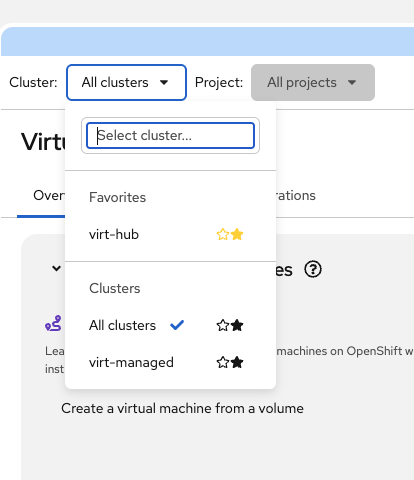
The Cluster and Project dropdown favorites display two star icons per menu item instead of one. This is caused by a PatternFly 6.4.x change where the Button component now renders both an OutlinedStarIcon and a StarIcon and relies on new CSS classes (pf-v6-c-button__icon-favorite / pf-v6-c-button__icon-favorited) to toggle visibility. When the console host CSS does not include these newer rules, both stars are visible.
Version-Release number of selected component (if applicable):
PatternFly react-core 6.4.x
How reproducible:
Always - when running kubevirt-plugin with PF 6.4.x against a console host that does not ship the matching PF CSS.
Steps to Reproduce:
1. Open Virtualization > Overview page
2. Click on the Cluster or Project dropdown
3. Observe the star/favorite icons next to each dropdown item
Actual results:
Two star icons appear per menu item (one outline, one filled) instead of a single star.
Expected results:
A single star icon per menu item - outline when not favorited, filled when favorited.
Additional info:
Root cause: PF 6.4.x MenuItem with isFavorited creates a MenuItemAction that passes isFavorite/isFavorited to the Button component. The new Button renders two star React components and uses CSS to show/hide them. If the host CSS predates these rules, both are visible.

Fix: Added CSS fallback in Dropdown.scss that handles the show/hide toggle and disables the favorite animation.