Uploaded image for project: 'OpenShift Virtualization'
  1. OpenShift Virtualization
  2. CNV-73890

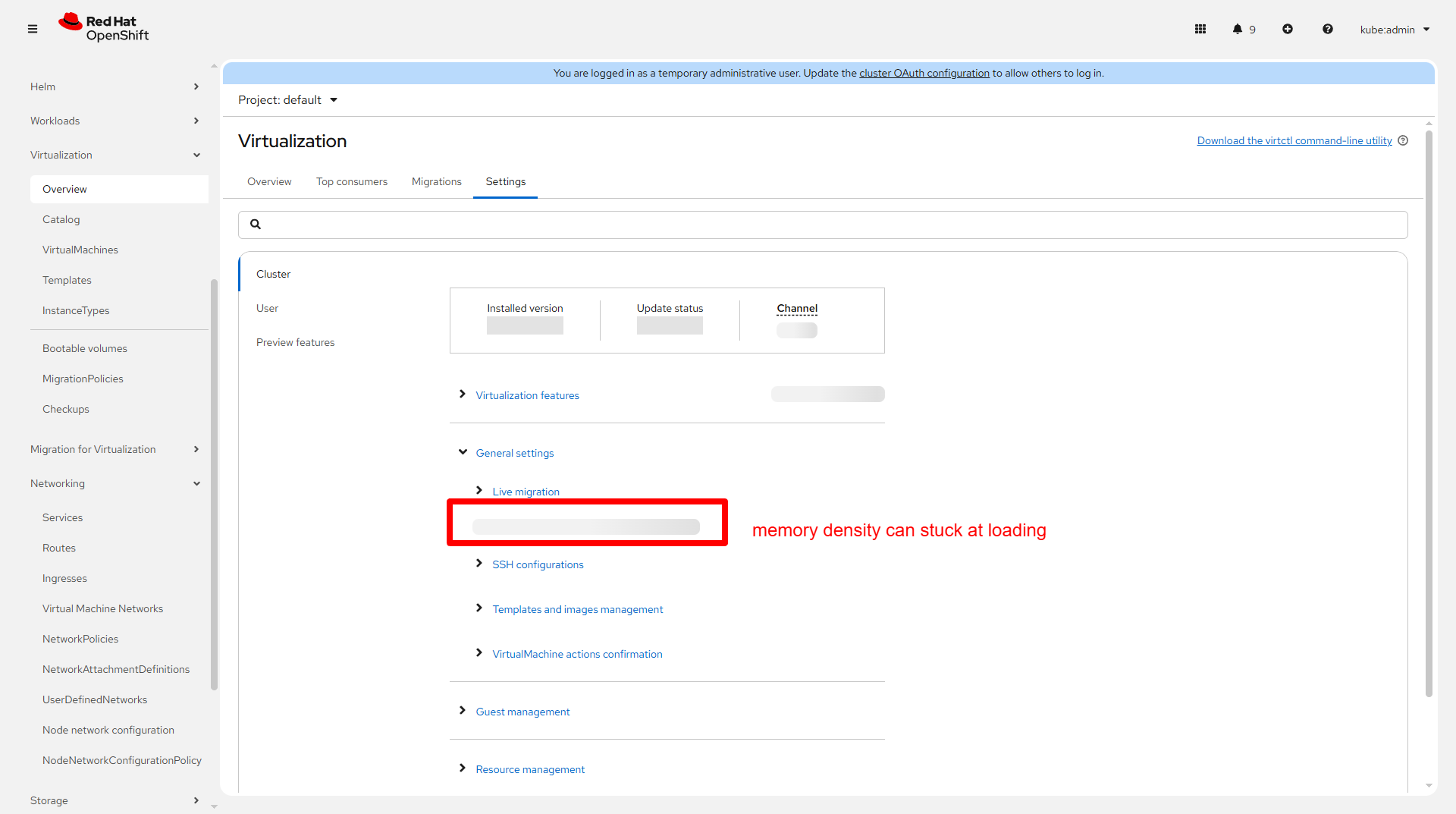
Memory density feature takes some time to show

XMLWordPrintable

    • Icon: Bug Bug
    • Resolution: Unresolved
    • Icon: Normal Normal
    • CNV v4.21.0
    • None
    • CNV User Interface
    • None
    • Quality / Stability / Reliability
    • 2
    • False
    • Hide

      None

      Show
      None
    • False
    • None
    • None

      Description of problem:

      Memory density feature takes some time to show

      Version-Release number of selected component (if applicable):

      v4.21

      How reproducible:

      100%

      Steps to Reproduce:

      1. Go to Overview -> Settings -> Cluster -> General settings
      2.
      3.
      

      Actual results:

      Memory density feature does not show up immediately like others

      Expected results:


      Additional info:
       

              rh-ee-bnahmias Batya Nahmias Rivkin
              gouyang1@redhat.com Guohua Ouyang
              Guohua Ouyang Guohua Ouyang
              Votes:
              0 Vote for this issue
              Watchers:
              3 Start watching this issue

                Created:
                Updated: