-
Bug
-
Resolution: Done-Errata
-
 Normal
-
None
-
Quality / Stability / Reliability
-
2
-
False
-
-
False
-
CNV v4.21.0.rhel9-42
-
-
None
Description of problem:
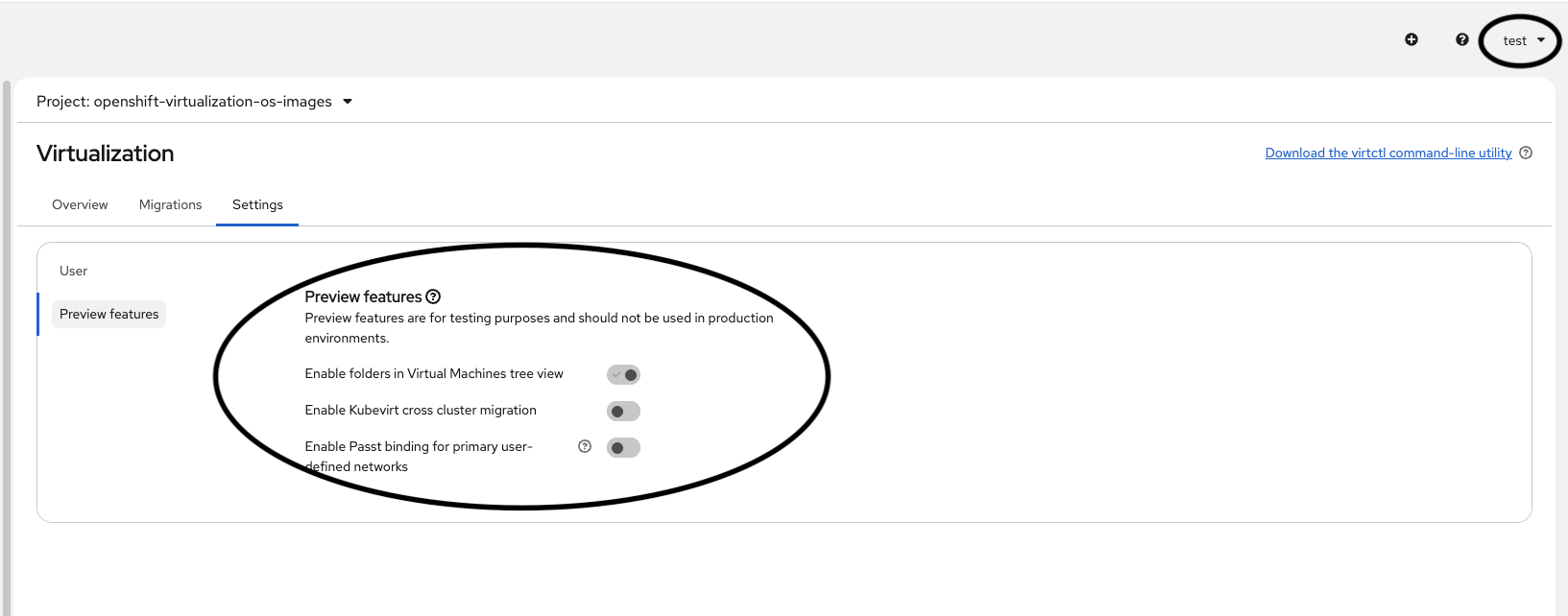
Preview features are visible in the Settings tab to all users, including non-admins. This feature should only be accessible to users with admin privileges.
Version-Release number of selected component (if applicable):
How reproducible:
Always
Steps to Reproduce:
1. Log in as a non-admin user.
2. Navigate to the Settings tab in Virtualization / Overview.
3. Observe the availability of the "Preview features" section/setting.
Actual results:
The "Preview features" section is visible and accessible in the Settings tab for the non-admin user.
Expected results:
The "Preview features" section should be hidden and inaccessible in the Settings tab for the non-admin user. It should only be displayed when an admin is logged in.
Additional info:
- relates to
-
CNV-73187 QE Automation fix/missing: Preview features are visible in the Settings tab to all users
-
- Closed
-
- links to
-
 RHEA-2025:155516
OpenShift Virtualization 4.21.0 Images
RHEA-2025:155516
OpenShift Virtualization 4.21.0 Images
- mentioned on

(1 mentioned on)

