-
Task
-
Resolution: Done
-
 Undefined
-
None
-
False
-
-
False
-
-
-
No
Create an informative issue (See each section, incomplete templates/issues won't be triaged)
Using the current documentation as a model, please complete the issue template.
Note: Doc team updates the current version and the two previous versions (n-2). For earlier versions, we will address only high-priority, customer-reported issues for releases in support.
Prerequisite: Start with what we have
Always look at the current documentation to describe the change that is needed. Use the source or portal link for Step 4:
- Use the Customer Portal: https://access.redhat.com/documentation/en-us/red_hat_advanced_cluster_management_for_kubernetes
- Use the GitHub link to find the staged docs in the repository: https://github.com/stolostron/rhacm-docs
Describe the changes in the doc and link to your dev story
Provide info for the following steps:
1. - [x] Mandatory Add the required version to the Fix version/s field.
2. - [x] Mandatory Choose the type of documentation change.
- [x] New topic in an existing section or new section
- [ ] Update to an existing topic
3. - [ ] Mandatory for GA content:
- [x] Add steps and/or other important conceptual information here:
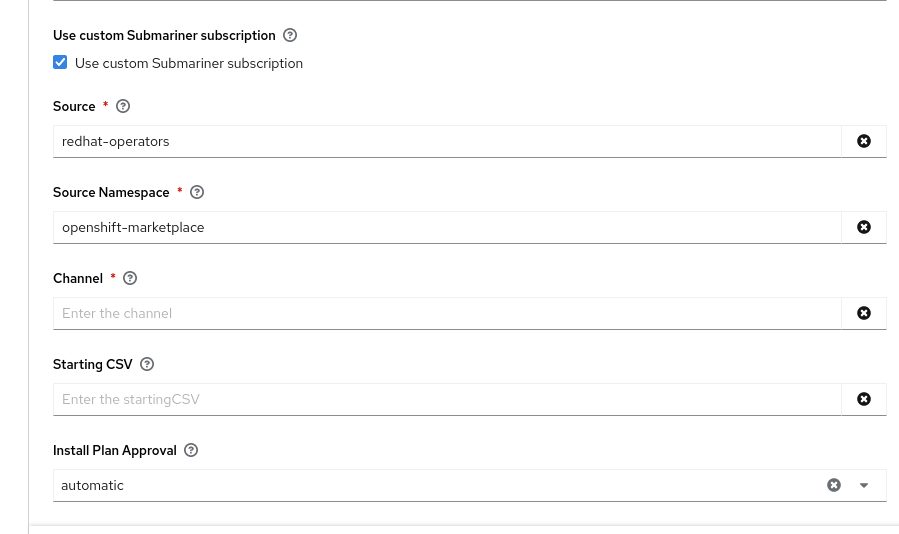
In the "Customizing Submariner deployments" section, add a description of the "Use custom Submariner subscription" section (which is available on the same installation screen as the last subsection, "Cable driver"). This section has the following fields:
- Source: the catalog source to use for the Submariner subscription
- Source Namespace: the namespace of the catalog source
- Channel: the channel to follow for the subscription (for ACM 2.9, this should be "stable-0.16")
- Starting CSV: the initial ClusterServiceVersion (optional)
- Install Plan Approval: whether install plans should be approved automatically or manually
The latter option is the only way to get the Submariner install plan to be manually approved.
The last part should also be added to the known issues for Submariner: the Submariner install plan doesn't follow overall install plan settings, and can't be controlled from the operator management screen. By default, Submariner install plans are applied automatically, and the Submariner addon is always updated to the latest available version corresponding to the installed ACM version. To change this behaviour, users must use a custom Submariner subscription.
- [x] Add Required access level for the user to complete the task here:
Identical to the rest of the Submariner addon installation feature.
- [ ] Add verification at the end of the task, how does the user verify success (a command to run or a result to see?)
- [ ] Add link to dev story here:
4. - [ ] Mandatory for bugs: What is the diff? Clearly define what the problem is, what the change is, and link to the current documentation: