Uploaded image for project: 'JBoss BPMS Platform'
  1. JBoss BPMS Platform
  2. RHBPMS-2188

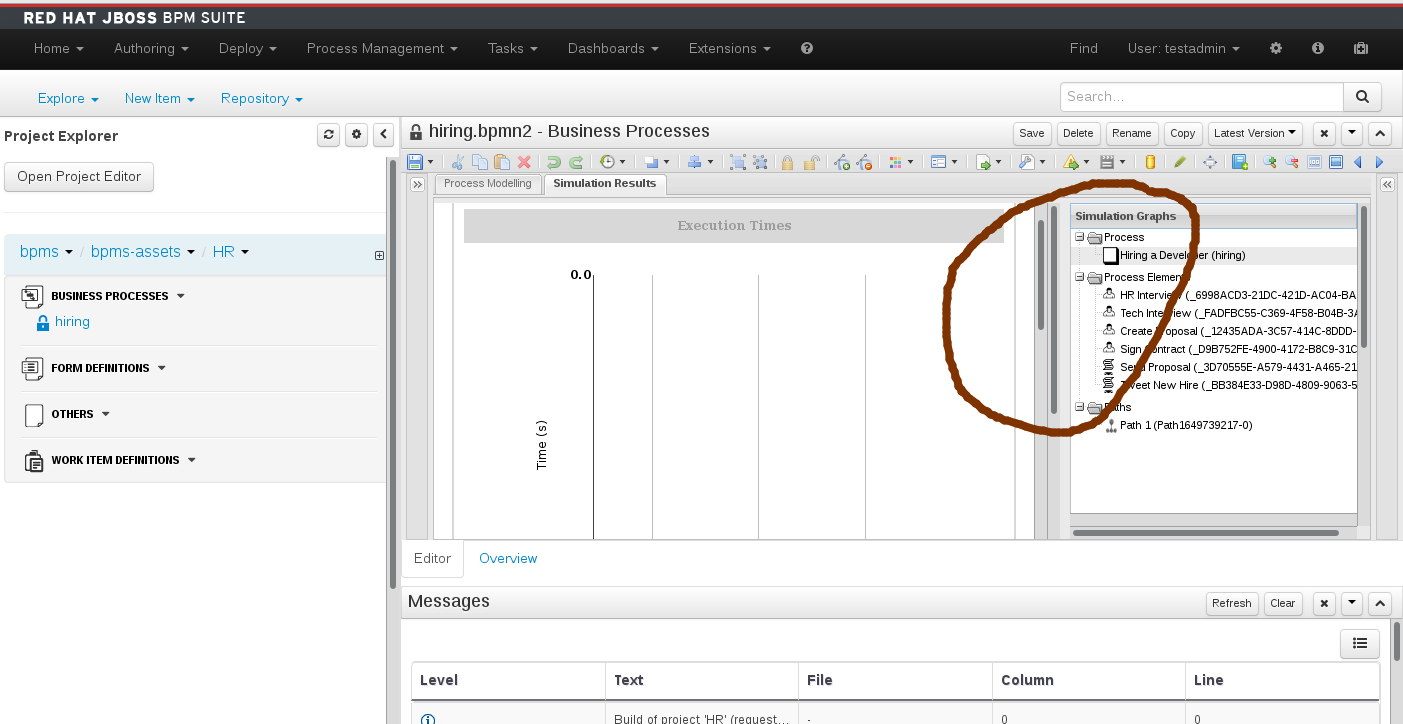
Simulation charts panel in Designer contains two scroll bars when you open it in a lower resolution

XMLWordPrintable

    • Icon: Bug Bug
    • Resolution: Duplicate
    • Icon: Major Major
    • None
    • 6.2.0
    • jBPM Designer
    • None

      Simulation charts panel in Designer contains two scroll bars - this is confusing; user is not sure which one he should use.

      steps to reproduce:
      1. open a process in a Designer
      2. run a simulation
      3. resize the browser
      4. take a look at simulation charts - there are two scroll bars

      The issue exists since 6.0.0 (shortly mentioned in bug 1007879), still present in 6.2.0.GA

      Please see the attached screenshot.
              rhn-support-tsurdilo Tihomir Surdilovic (Inactive)
              rsynek@redhat.com Radovan Synek (Inactive)
              Kirill Gaevskii Kirill Gaevskii
              Kirill Gaevskii Kirill Gaevskii
              Votes:
              0 Vote for this issue
              Watchers:
              1 Start watching this issue

                Created:
                Updated:
                Resolved: