Uploaded image for project: 'OCMUI - OpenShift Cluster Manager UI'
  1. OCMUI - OpenShift Cluster Manager UI
  2. OCMUI-3917

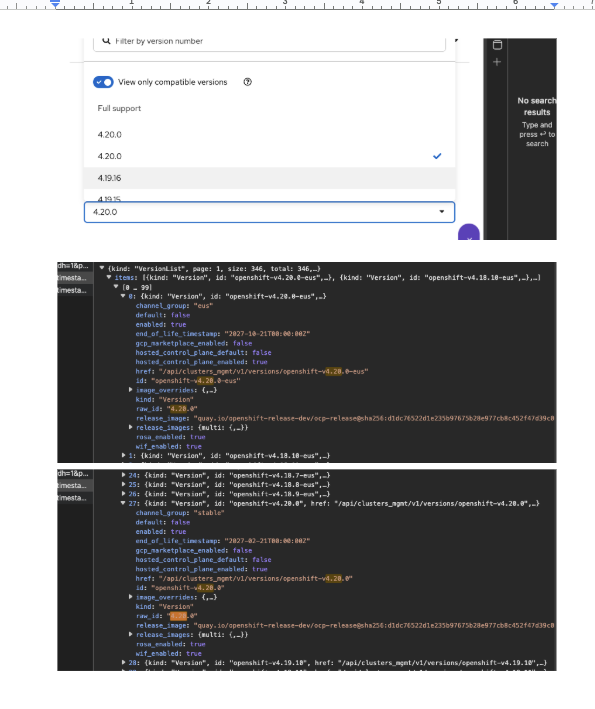
The wizard's version dropdown shows duplicate OCP version values, which can be confusing for users

XMLWordPrintable

    • Icon: Bug Bug
    • Resolution: Done
    • Icon: Critical Critical
    • None
    • None
    • None
    • Quality / Stability / Reliability
    • False
    • Hide

      None

      Show
      None
    • True
    • OCMUI Team Sprint 278, OCMUI Team Sprint 279

      Environment: Production

      Url: https://console.redhat.com/openshift 

      Browser: Any browser

      OS: MacOS (but doesn't matter the OS and type)

      Priority: Critical as the 4.20 release done to production and influences for 4.20 cluster creations via Wizard

      Reproduction steps:

      • Login to OCMUI prod env.
      • Launch a cluster wizard  (ex: OSD or ROSA wizard)
      • Reach to Cluster settings > details step
      • Click "Version" dropdown and try to select the 4.20 version.
      • See the behavior.

      Current Result:

      The wizard's version dropdown displays duplicate OCP 4.20 entries, which can be confusing for users as there's no clear differentiation between the listed versions.

      Expected Result:

      Remove the duplicated OCP 4.20 versions from the wizard's version dropdown to avoid user confusion.

      Attached recording Screen Recording 2025-10-24 at 12.13.19 PM.mov
        1. Screen Recording 2025-10-24 at 12.13.19 PM.mov
          3.43 MB
          Jayakrishnan Mekkattillam
        2. image-2025-10-24-13-09-36-824.png
          129 kB
          Jayakrishnan Mekkattillam

              rh-ee-dcooper Dylan Cooper
              jmekkatt@redhat.com Jayakrishnan Mekkattillam
              Jayakrishnan Mekkattillam Jayakrishnan Mekkattillam
              Votes:
              0 Vote for this issue
              Watchers:
              3 Start watching this issue

                Created:
                Updated:
                Resolved: