-
Bug
-
Resolution: Unresolved
-
 Normal
-
None
-
Quality / Stability / Reliability
-
False
-
-
False
-
CNV v4.21.0.rhel9-25
-
-
None
Description of problem:
On Virtualiztion settings page enable users defined SSH key to be used for connecting to VMs via SSH.
The SSH key settings enable creating or using existing Secret containing SSH key.
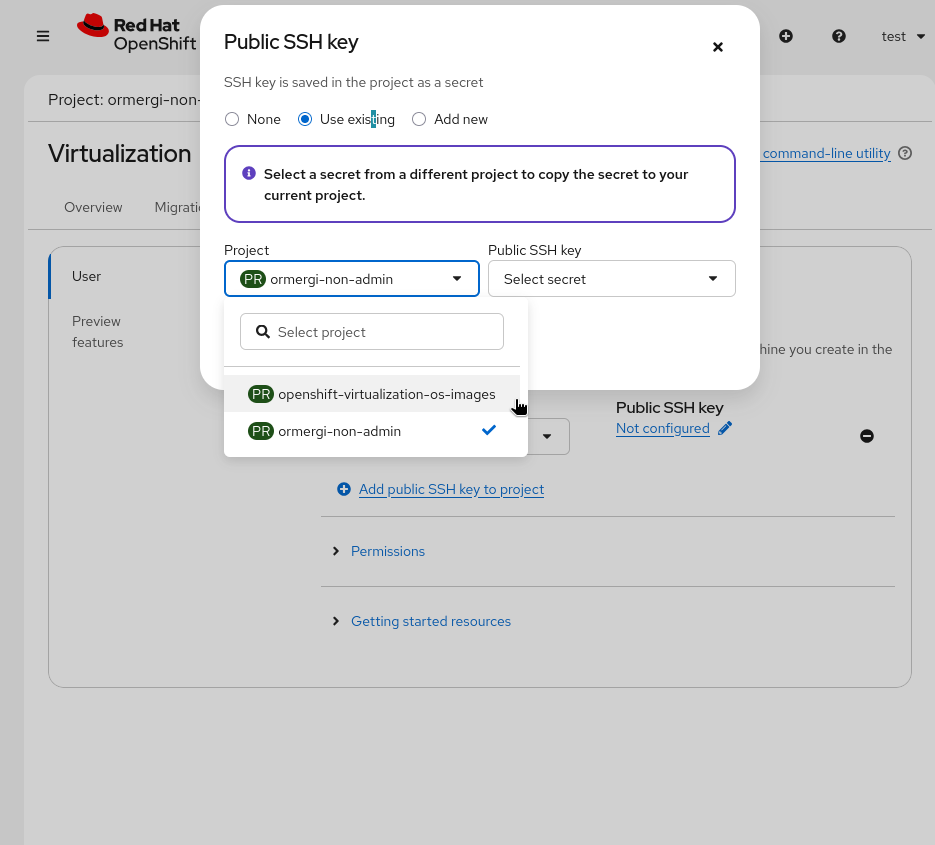
When logged in with non-admin user, the SSH key selection dialog expose the "openshift-virtualiztion-os-images" which is not visible for non-admin users in the first place.
In addition the "openshift-virtualiztion-os-images" is subsystem namespaces that should not be used for provisioning secrets for some user to use.

See the attached screenshot
Version-Release number of selected component (if applicable):
How reproducible:
Steps to Reproduce:
1. Go to Virtualiztion view
2. Settings tab
3. Uset > Manage SSH Keys
4. Select project that's available for the connected user
5. Under public ssh key, click on "Not configured"
6. On the pop up "Public SSH key" window, select "Use Existing"
7. Click on the "Project" drop down list
Actual results:
- We see namespaces that should not be exposed to non-admin user - "openshift-virtualiztion-os-images".
- The "openshift-virtualiztion-os-images" is subesystem compoent namespace and should not be used for provisioning secrets, regardless of the user role.
Expected results:
- When non-admin user is logged in, the SSH key selection to not present namespace that are not visible for non-admin users.
- The SSH key selection to not present any subsystem namespace (starts with openshift-*).
Additional info:
- links to
-
 RHEA-2025:155516
OpenShift Virtualization 4.21.0 Images
RHEA-2025:155516
OpenShift Virtualization 4.21.0 Images
- mentioned on

